LunaPic logo

LunaPic

Rating: 4.5
User Satisfaction: 85%
LunaPic is a tool that does online photo editing for anyone needing basic to mid-level image tweaks so they can crop, enhance, stylize or prepare images quickly without software install.

Overview

If you need a quick way to edit or spruce up photos — for social media, blogs, small business product images, collages or memes — LunaPic gives you enough tools without paying or installing heavy software. It’s especially useful for users who don’t want to learn complex tools like Photoshop but still want more control than a basic “filter app.”

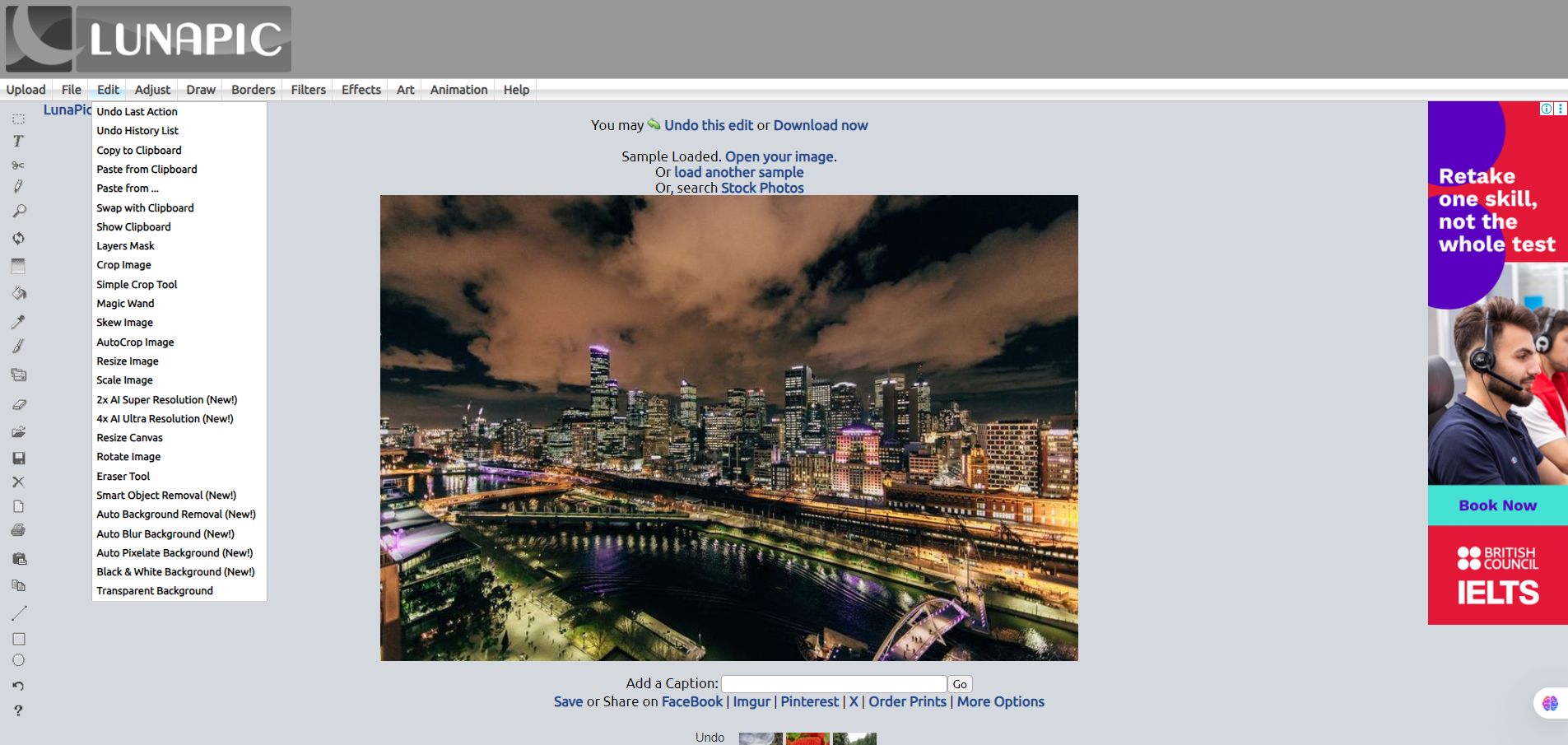
You visit the site, upload or provide a URL for an image, and then use menus to: crop/resize/rotate; adjust colors, brightness, contrast; add text, shapes or drawings; apply artistic filters or effects; remove or make backgrounds transparent (auto or manual), add borders/collages/animations; then save or download in common formats like PNG, JPG or GIF.




Details

Tool Launch / Founded Date

The public site has been around for many years; exact founding date not clearly disclosed.

Best for

Solo creators, bloggers, small business owners, social-media managers, students, anyone wanting occasional image editing without cost or installation.

Access Type

Free / Ad-supported / Browser-based (no installation, no login required)

Licensing Model

The platform does not claim copyright on images you create, meaning you’re free to use them. But if you upload someone else’s copyrighted image, their original copyright still applies.

Feature

  • Crop, resize, rotate, flip images easily. 
  • Magic-Wand / transparent-background / background removal (auto or manual). 
  • Apply filters, artistic effects (vintage, neon, painting/sketch, etc.), color adjustments.
  • Add text, shapes, drawing, watermarks, borders, collages.
  • Create simple animations / GIFs from images or apply motion effects.
  • Export images in common formats (PNG, JPG, GIF, even BMP, possibly other formats). 
  • Works entirely in-browser — no download or installation required, and no account needed.

Pricing Tables

Free Plan
$0 (always)
  • All editing tools available (crop, resize, filters, effects, background removal, text, drawing, animations, etc.) 
  • No signup required, no subscription, ad-supported.
  • Save/download images in common formats. 

There are no paid tiers or premium subscriptions — usage is entirely free.

Analytics

Traffic Analysis

Domain Rating
74
Organic Traffic
1210870
Majority Users
United States

Visits Over Time

No visit data found.

Traffic Sources

No traffic data found.

Last Update Date: 2025-12-08

FAQ

Is LunaPic really free?
Yes — you don’t need an account, signup, or payment. The tool is fully usable at no cost.
Can I use my edited images commercially (e.g. for my online store)?
Yes — LunaPic does not claim copyright over images you create. But if your source image is copyrighted, that original copyright still applies.
Do I need to install anything or use a special device?
No — it works via web browser, so you just need a device with internet (desktop, laptop, or even mobile).
Can I edit large / high-resolution images?
You can, but performance and results may suffer (upload issues, slower editing, or issues with large files). For high-res or complex editing, a dedicated desktop tool is usually better.
Does it support layers, masks, or advanced retouching like Photoshop?
Not really — it provides simple tools (drawing, filters, effects, magic wand), but lacks robust layer/mask management and fine retouch controls.
Are there any downsides like ads or privacy concerns?
Because the site is free and ad-supported, you will see ads. Also, there’s no account system — you must save your edited images locally before closing.
Is LunaPic suitable for professional or print-quality work?
Not ideal. For print-ready or professional-quality editing (color accuracy, advanced retouching, layered editing), you’re better off using more powerful desktop tools.

Related AI Tools

ToyPal is a storytelling device that attaches to soft toys and delivers personalized AI-generated stories for children so
Kidgeni is a tool that creates AI-generated art, stories, and books for children so they can learn, create,
SermonGPT is a tool that generates sermon drafts and outlines for pastors, ministers, and speakers so they can
Lyrics Generator is an AI songwriting tool that creates lyrics for musicians, creators, and hobbyists so they can
Love Letter Generator is a tool that creates personalized romantic letters for couples and individuals so they can
AI Diary is a journaling tool that uses AI conversations, mood tracking, and writing analysis to help people



