
desygner_logo

Desygner

Rating: 4.3
User Satisfaction: 78%
Desygner is a tool that helps marketers, small businesses, and content creators build on-brand graphics, editable PDFs and marketing templates so they can produce consistent marketing materials without a designer.

Alternative To

Overview

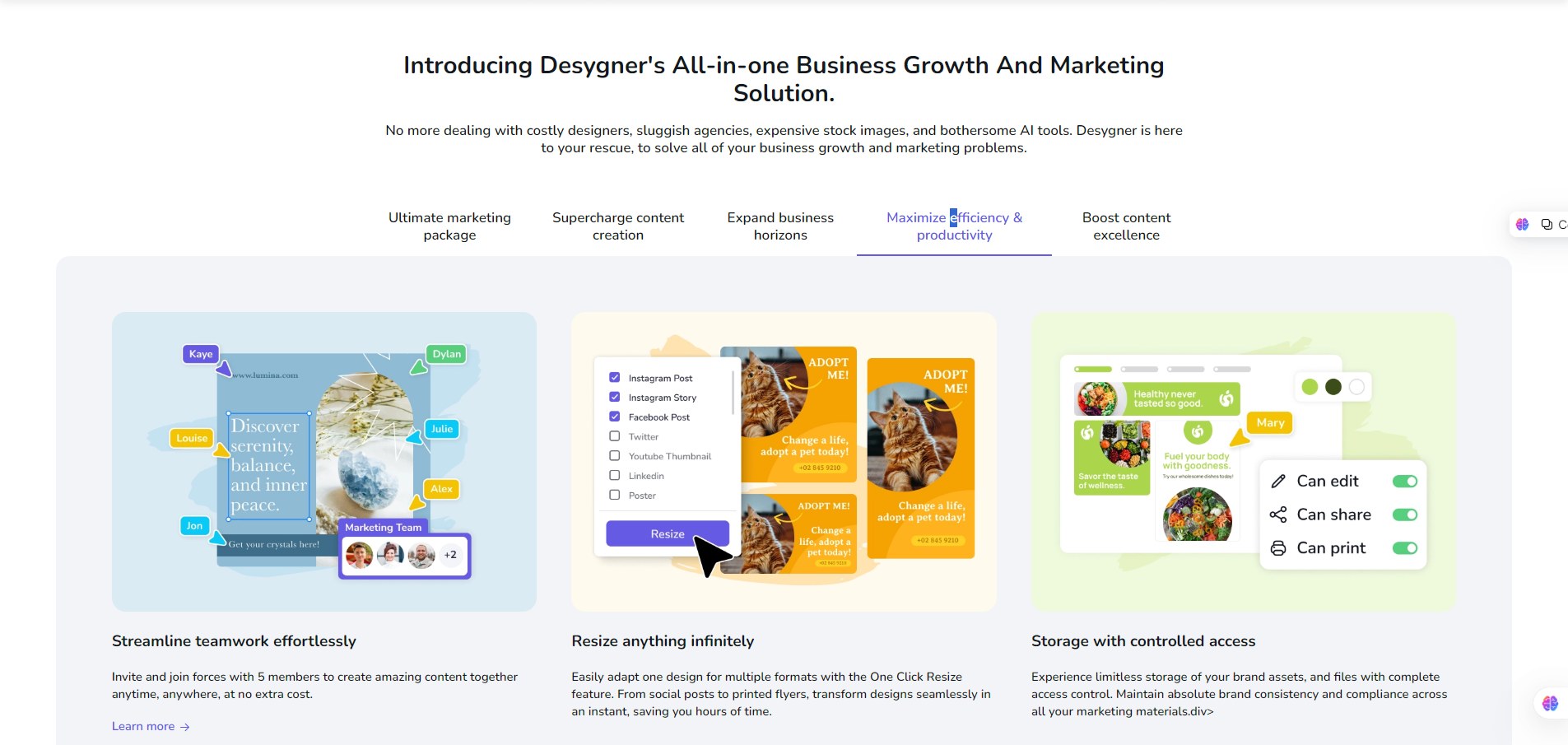
Desygner is a cloud-first design and brand management platform (web + iOS + Android) aimed at non-designers and SMB teams. It combines a drag-and-drop editor, editable PDF tools, lockable branded templates, a stock image library, and simple team/guest workflows so teams can create and distribute marketing assets without a full design team.

If you need lots of on-brand collateral — social posts, flyers, brochures, pitch decks, printable assets or editable PDFs — Desygner reduces bottlenecks. Marketing and local teams can customize approved templates, which keeps brand consistency and cuts agency spend. It’s a practical Canva/Adobe Express alternative with extra focus on brand governance and enterprise template control.

Sign up to Free, upgrade to Pro+ for premium assets and AI features, or choose Business/Enterprise for centralized brand libraries and role-based access. Core mechanics: prebuilt templates, drag-and-drop editor, single-click resize for multiple channel sizes, PDF import/edit, background removal, animation, and AI copy generation. Enterprise customers get implementation and integrations for large-scale brand governance.


Details

Tool Launch / Founded Date

Founded ~2016-01-01 (approx.; company traces back to 2015–2016 on multiple profiles).

Best for

Solo creators, small marketing teams, franchise/local marketing ops, real-estate offices, education/nonprofits, SMBs needing templated brand control.

Access Type

Free tier; Pro+ (paid subscription); Business (team subscription); Enterprise (custom). Yearly and monthly billing available.

Licensing Model

Proprietary platform. Users generally get commercial use rights when they use their own images or Desygner’s royalty-free collections — confirm exact licensing for Shutterstock or other premium assets before redistribution.

Feature

  • Editable PDF import and export (edit PDFs like a design file).
  • Lockable, brand-controlled templates for teams.
  • One-click resize: repurpose a single design across formats.
  • Background remover, asset libraries, version history.
  • Social scheduler (basic mobile scheduling).
  • AI Text Generator (ChatGPT-based) for copy starters; in-app AI image generation being rolled out.
  • Unlimited asset storage on paid plans; large stock library (Shutterstock integrations on paid tiers).
  • Guest roles and pay-as-you-go “bucket” actions for occasional contributors.

Pricing Tables

Free
$0
  • Single user.
  • Access to free templates, basic editor, millions of free images & icons (limited assets library).
  • Import/edit up to 10 PDF files (free tier limits).
  • Use on web, iOS, Android.
Pro+
$59.40 / year
  • All Free features plus: unlock premium templates and fonts.
  • AI text generator (ChatGPT-powered).
  • AI Image Creator and expanded stock library access (varies by plan/region).
  • Unlimited asset storage, unlimited resizing, PDF import/export, background remover, social scheduler.
  • Invite up to 5 team members (per current promo/info).
Business
starts at $29.95 / month
  • Everything in Pro+.
  • Team/branding controls: lockable templates, multiple asset libraries, role-based permissions, guest actions (buckets).
  • Pricing model: flat rate for first 6 people (example US$29.95/month for first 6), then per-user pricing decreases with scale. Yearly billing can save ~50% per official pricing calculator.
  • Enterprise: custom pricing and implementation for very large orgs.

Analytics

Traffic Analysis

Domain Rating
72
Organic Traffic
136909
Majority Users
United States

Visits Over Time

No visit data found.

Traffic Sources

No traffic data found.

Last Update Date: 2025-12-08

FAQ

Can I use Desygner output commercially?
Generally yes — you can use designs commercially when you supply your own images or when you use Desygner’s licensed royalty-free assets. If you use third-party stock (e.g., Shutterstock) check the license terms for resale or mass redistribution.
How many designs can I create per month?
There’s no strict “design count” cap on paid plans; limits are more about feature access (PDF imports, stock asset use) and guest action buckets for Business plans. Free plan has limited PDF imports and asset access.
Can I edit PDFs and InDesign files?
Yes — Desygner supports PDF import and editing. The site also advertises InDesign and Figma import/compatibility for project transfer on paid plans.
Does it integrate with other tools / have an API?
Public, self-serve API documentation is not prominently published. Desygner offers enterprise integrations and partners; contact sales for API or automation needs. Zapier/integration workflows are commonly cited by customers using enterprise setups.
What’s the difference between Pro+ and Business?
Pro+ is aimed at individuals/small groups and unlocks premium templates, stock, AI features and unlimited storage. Business adds team controls: brand libraries, lockable templates, role permissions, guest buckets, and admin tools for scaling across many users.
Does Desygner use my content to train its AI?
Desygner publishes a privacy policy and indicates how it uses data; specifics about AI training and user opt outs are handled in legal docs and enterprise contracts. If this is critical, ask for a data-processing addendum or enterprise clause.
Is there support if I pay?
Yes — paid plans include access to support and an enterprise onboarding option. The site highlights a help center and dedicated enterprise support for larger customers.

Related AI Tools

JimmyGPT is an AI chatbot tool that helps individuals chat, brainstorm, and get coding or writing assistance through
Dreamland Stories is a tool that helps kids create personalized AI-generated stories with images and narration so they
WriteMyEssay.ai is a tool that generates academic essays, outlines, and citations for students so they can draft papers
StoryHero is an AI storytelling tool that creates personalized illustrated stories for children so parents, teachers, and kids
MindChat is a mental wellness and concussion monitoring platform that combines AI assessments with EEG data for clinicians,
FanFicGen is a tool that generates AI-written fan fiction stories for fandom creators so they can brainstorm plots,



