Background-Remover-Tools-autocliipping logo

AutoClipping

Rating: 3.9
User Satisfaction: 78%
AutoClipping is a tool that removes backgrounds from photos and images so you can create product shots, promotional graphics, or transparent images for web and print.

Alternative To

Overview

AutoClipping is an online image editing tool focused on removing backgrounds from photos. It runs entirely in your browser and works for product shots, presentations, social media graphics, and other marketing needs.  

Background removal is a common task for eCommerce sellers, designers, and marketers. Doing this manually in Photoshop is slow and costly. AutoClipping uses automation to deliver transparent or white background images quickly without advanced software. 

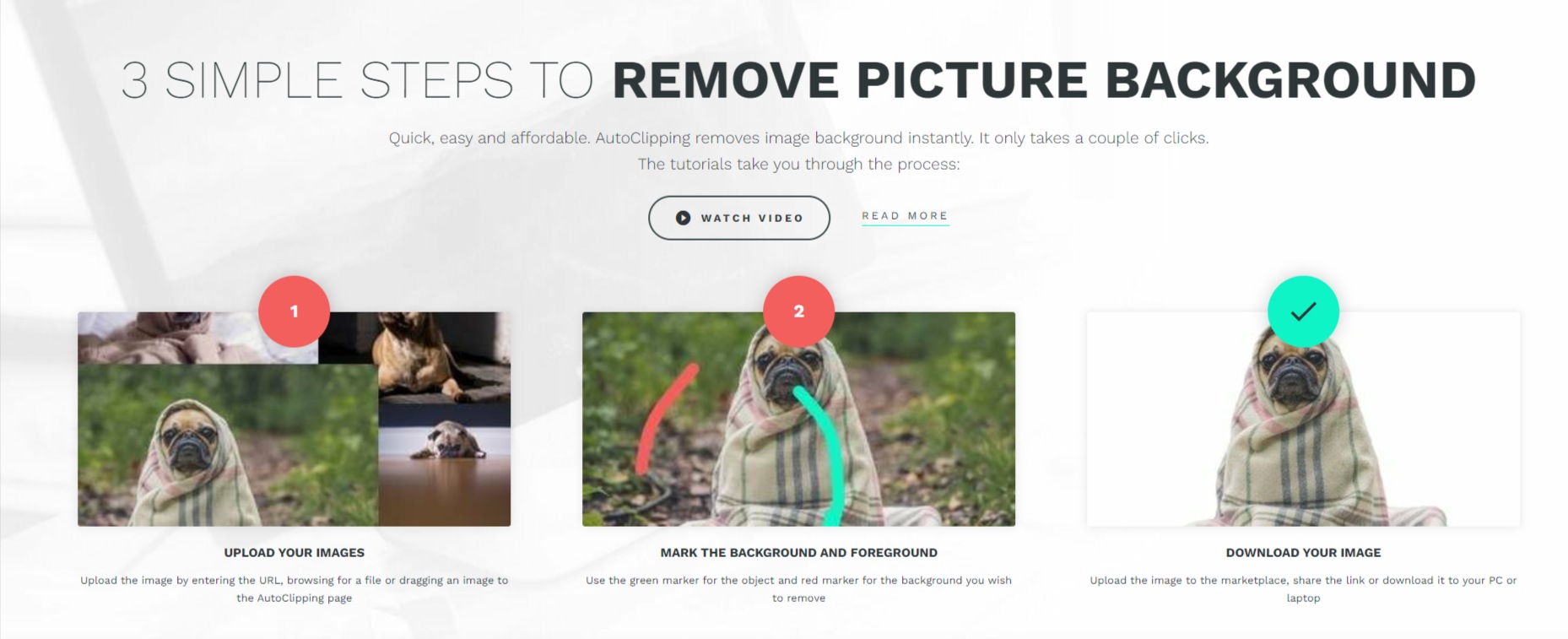
Upload an image via drag-and-drop, file browse, or URL. Then mark foreground and background areas using simple brushes, refine edges, and download the result. It also offers bulk processing and API integration for high-volume workflows.


 

Details

Tool Launch / Founded Date

n/a (site active at least since 2020)

Best for

eCommerce sellers, small design teams, marketers, freelancers

Access Type

Freemium (free credits), Paid subscription & Pay-as-you-go credits

Licensing Model

Commercial use allowed on paid plans; free plan limited to non-commercial use

Feature

  • Automatic background removal with simple upload and one-click processing. 
  • Easy manual refinement with foreground/background brushes and edge tools.  
  • Cloud-based workflow — no software to install.  
  • Batch processing & API options for high-volume needs.  
  • Flexible pricing models: free credits, subscriptions, and pay-as-you-go. 
  • Marketplace compliance guidance (e.g., white backgrounds for Amazon).

Pricing Tables

Free
$0 (Non-commercial)
  • Up to 5 free downloads
  • Low resolution (~0.4MP)
  • Non-commercial use only 
PAY AS YOU GO
$2.99/mo
  • 10 image downloads/month
  • Commercial use allowed
  • Up to 4 megapixel images
  • Enhanced processing
  • Unlimited storage for photos
  • Ideal for print media
  • Ideal for banners
  • Ideal for posters
  • Ideal for flyers
  • Ideal for ads
  • Amazon compliant images
  • Ebay compliant images
SUBSCRIBE
$9.99/mo
  • 300 image downloads/month
  • Commercial use allowed
  • Up to 4 megapixel images
  • Enhanced processing
  • Unlimited storage for photos
  • Ideal for print media
  • Ideal for banners
  • Ideal for posters
  • Ideal for flyers
  • Ideal for ads
  • Amazon compliant images
  • Ebay compliant images

Analytics

Traffic Analysis

Domain Rating
53
Organic Traffic
240
Majority Users
United Kingdom

Visits Over Time

No visit data found.

Traffic Sources

No traffic data found.

Last Update Date: 2026-01-14

FAQ

Can I use AutoClipping for commercial images?
Yes, commercial use is allowed on paid plans. Free credits are generally for non-commercial use only.
How many images can I process per month?
That depends on your plan — from a handful on free/basic plans to thousands on higher subscription tiers or bulk packages.
Does AutoClipping offer bulk processing?
Yes — there are bulk subscriptions and API options for high-volume background removal.
Do I need special software?
No — it’s fully browser-based; upload images and you’re ready to go.
What output formats are supported?
Transparent PNG and other common formats are supported when downloading results

Related AI Tools

StoryGenerate is a tool that generates AI-written stories and plot ideas for writers and creators so they can
Newt is a tool that helps teams research, write, and organize content using AI so they can produce
Prescene is a tool that helps filmmakers and content creators plan scenes, scripts, and shot lists using AI
Jarvis AI is a tool that generates song lyrics for musicians and creators so they can quickly write
StoryBee is a tool that generates personalized stories and learning content for kids and educators so they can
ScribaMax is a tool that generates written content using AI for marketers and creators so they can produce



