trint logo

Trint

Rating: 4.3/5
User Satisfaction: 78%
Trint is a tool that converts audio and video files into text for individuals and teams so they can transcribe, edit, collaborate and repurpose spoken content.

Alternative To

Overview

Trint is a cloud-based platform that uses AI to transcribe audio and video files into text. Once a file is uploaded, you get a transcript you can search, edit, annotate and share. It also supports collaborative workflows, multiple languages, and integrations.

If you deal with recorded interviews, podcasts, meetings, research sessions or video content, manual transcription is time-consuming. Trint helps you reduce the time spent converting speech to text, makes content searchable and enables teams to collaborate on the output. It’s especially useful for media/marketing teams, researchers or legal firms working with a lot of spoken content. Reviews highlight the strong team-features and editing tools. 

  • Upload your audio or video file to the Trint dashboard.
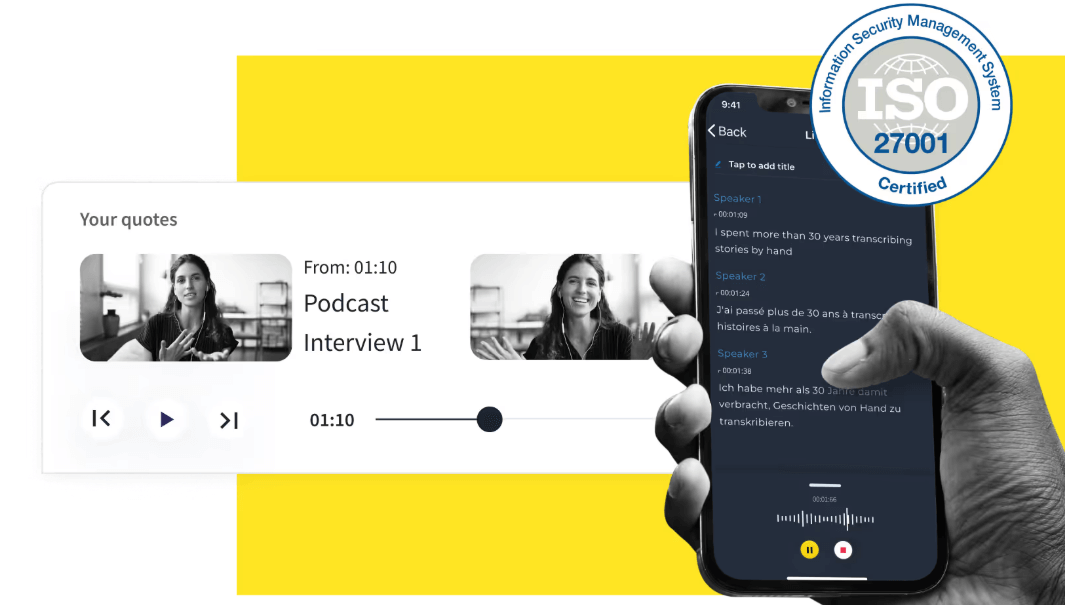
  • The AI transcribes the speech into text; you then edit via a browser-based editor that links text to timecodes. 
  • You can identify speakers, search within the transcript, export to caption/subtitle formats, collaborate with teammates, or build ‘story’ clips from transcripts. 
  • Data is processed securely; Trint claims it does not use your transcripts to train its models and offers ISO 27001 certification.


Details

Tool Launch / Founded Date

2016

Best for

Journalists, podcasters, content teams, researchers, legal firms, marketing teams that handle lots of spoken content and want collaboration + searchability.

Access Type

Subscription (seats/users) model; Free trial available.

Licensing Model

Proprietary software. As per site, you retain control of your transcripts and your data isn't used to train their models.

Feature

  • AI-powered transcription of audio & video into editable text.
  • Browser editor linking transcript text with timecodes, enabling you to click text to jump in audio/video. 
  • Speaker identification (multi-speaker support) and searching within transcripts. 
  • Subtitle/caption generation and export in various formats (SRT, etc.).
  • Collaboration tools: share transcripts, invite others (including non-subscribers) to view/edit, build shared workspaces. 
  • Multilingual support: Transcription in 40+ languages, translation into 50+ languages. 
  • Integrations/API: Mobile app, integrations with video editing & workflow tools, API access for automation. 
  • Security and data control: ISO 27001, data region choice, claim of no algorithm training on your data.

Pricing Tables

Starter
$80 per user/month (annual billing lower)
  • Upload/transcribe up to a moderate number of files each month (approximately 7 files per month as per one source) 
  • Edit transcripts, generate subtitles/captions, automatic speaker ID, collaboration with limited team seats.
Advanced
$100 per user/month
  • Unlimited (or very high) transcription minutes under fair-use, mobile app access, shared workspaces, translation into many languages.
  • Suited for teams producing large volumes.
Enterprise
Custom pricing (Contact Sales)

Includes everything in Advanced plus live transcription (real-time), API/automation, stronger security/compliance (SSO, audit logs, high volume), dedicated support/onboarding.

Analytics

Traffic Analysis

Domain Rating
71
Organic Traffic
49.4K
Majority Users
United States

Visits Over Time

No visit data found.

Traffic Sources

No traffic data found.

Last Update Date: 2025-11-10

FAQ

Can I use transcripts commercially (e.g., publish or sell/transcribe content for clients)?
Yes, you control your data and Trint states you retain rights to your transcripts. However, you’ll want to review their Terms of Use for any specific restrictions.
How many minutes/files can I transcribe each month?
It depends on the plan. For example, one source states ~7 files per month under the Starter plan. For truly unlimited minutes you’d need the Advanced plan (subject to fair-use)
Can I edit the transcript and export in different formats?
Yes — Trint offers a browser-based editor, you can correct/edit transcripts, then export as text, SRT (subtitles), etc.
Does it integrate with other tools/workflows?
Yes — Trint offers integrations (e.g., video editing workflows, Zoom, APIs) and a mobile app. You’ll want to check if your specific tools are supported.
What about privacy and data usage — does Trint use my content to train AI?
According to Trint, they do not train their models on your uploaded transcripts and offer security certifications (ISO 27001) and data region options.
If I’m on the Starter plan and later need more transcription, how easy is it to scale?
You can upgrade to the Advanced or Enterprise tier. But if your usage spikes, you may need to negotiate with sales for volume/fair-use terms.
Is there a free trial?
Yes — Trint offers a 7-day free trial with access to full features (you can transcribe up to ~3 files) without requiring a credit card.

Related AI Tools

ToyPal is a storytelling device that attaches to soft toys and delivers personalized AI-generated stories for children so
Kidgeni is a tool that creates AI-generated art, stories, and books for children so they can learn, create,
SermonGPT is a tool that generates sermon drafts and outlines for pastors, ministers, and speakers so they can
Lyrics Generator is an AI songwriting tool that creates lyrics for musicians, creators, and hobbyists so they can
Love Letter Generator is a tool that creates personalized romantic letters for couples and individuals so they can
AI Diary is a journaling tool that uses AI conversations, mood tracking, and writing analysis to help people



