builtwith_logo

BuiltWith Trends

Rating: 4.2
User Satisfaction: 75%
BuiltWith Trends is a tool that shows you how web technologies (CMSs, e-commerce platforms, analytics tools, hosting providers) are being adopted across live websites so you can spot market trends, peer technology usage, and competitive shifts.

Alternative To

Overview

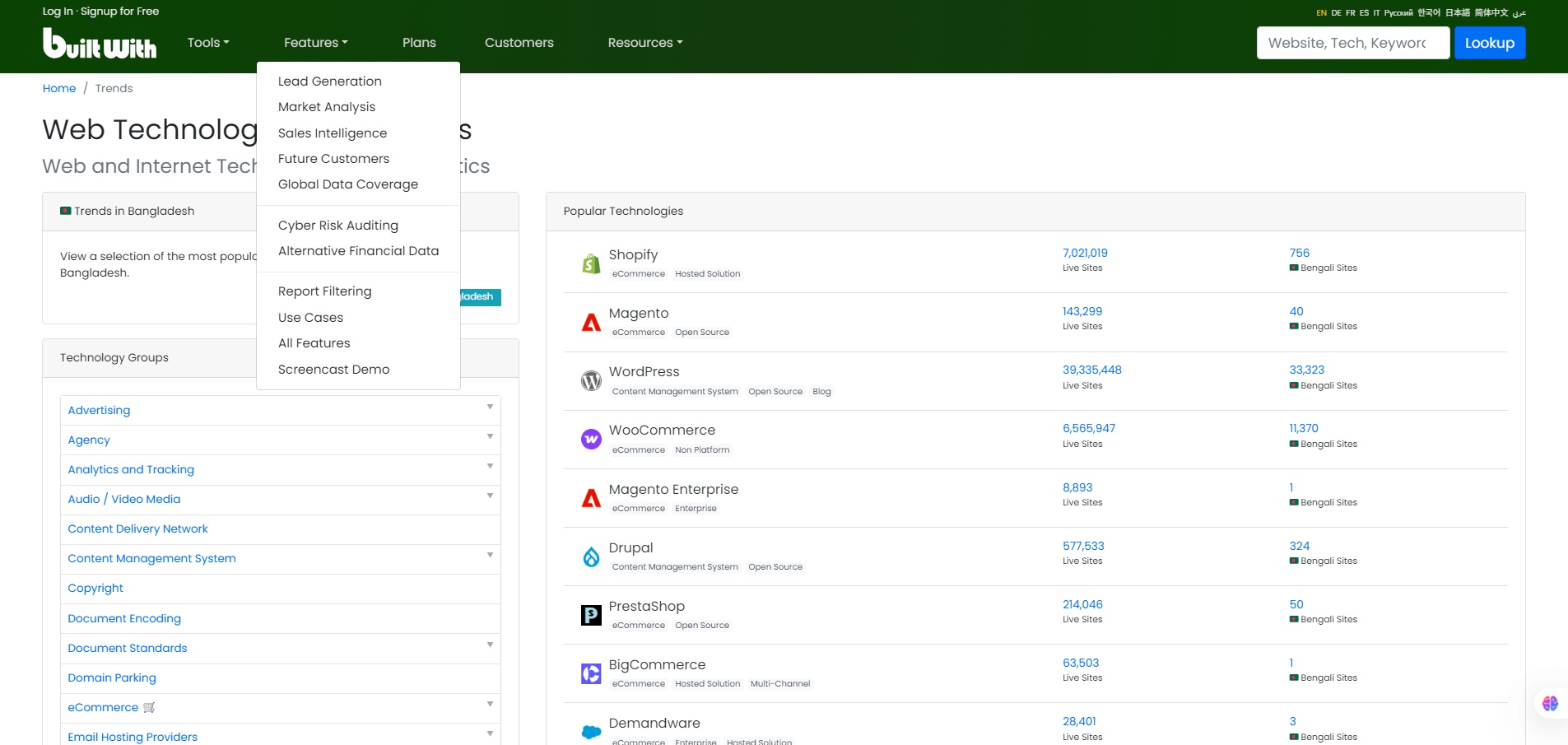
BuiltWith Trends is the “technology adoption” section of the BuiltWith platform. It tracks and presents statistics on which web technologies are in use on live websites (for example: how many sites use a certain CMS, analytics tool, payment processor, etc). On the Trends site you can browse by category (e.g., “Content Management System”, “Payment”, “Hosting”) and see counts of live sites using specific technologies. 

If you’re a founder, marketer, developer or product operator, knowing which technologies are gaining or losing usage can help you:

  • Choose which platform or tool to integrate with or build for (if you’re a vendor)
  • See if your competitors or target customers are upgrading or switching tech
  • Understand market maturity: Is your chosen tech niche saturated or still growing?
  • Monitor shifts: for example a large move away from one CMS could signal opportunity.

Details

Tool Launch / Founded Date

BuiltWith as a service has been around since ~2007-2008; the Trends section was referenced even back in 2009 in their blog.

Best for

Tech vendors (SaaS or platform) looking to see how many live sites use target technologies; Marketing agencies wanting to segment clients by tech stack; Developers choosing which platforms to support; Product/strategy teams evaluating technology signals; Investors or business analysts tracking tech adoption.

Access Type

Freemium/paid (BuiltWith offers free site lookups, but for full reports, large exports, and trend data you’ll likely need a paid plan). For the Trends pages you can view public counts, but many features are behind a paid tier

Licensing Model

Proprietary (BuiltWith owns the dataset). Users get access rights per subscription; you’ll need to check usage rights if you use exports commercially.

Feature

  • Tracks live usage counts of technologies across millions of websites (e.g., “how many live sites use Shopify” etc.) 
  • Drill-down by technology category (CMS, e-commerce, analytics, hosting) and by region/country.
  • Trend analysis: you can see adoption growth or decline over time for specific technologies.
  • Useable for lead generation / identifying companies using particular tech stacks (via other BuiltWith products).
  • Exportable and/or API access for integration into your workflows (depending on plan).

Pricing Tables

Basic
$295
  • Technologies-2
  • Keywords-2
  • Retail Reports-2
  • System Logins-1
Pro
$495
  • Technologies-Unlimited
  • Keywords-Unlimited
  • Retail Reports-Unlimited
  • System Logins-1
Team
$995
  • Technologies-Unlimited
  • Keywords-Unlimited
  • Retail Reports-Unlimited
  • System Logins-Unlimited

Analytics

Traffic Analysis

Domain Rating
86
Organic Traffic
24572
Majority Users
United States

Visits Over Time

No visit data found.

Traffic Sources

No traffic data found.

Last Update Date: 2025-11-26

FAQ

Can I use the output commercially (e.g., in a report I publish)?
Yes — you have access to the data as part of your subscription rights, but you must check the licensing terms of your plan. If you intend to publish or resell the raw data you’ll likely need a higher-tier or custom license.
How many websites does BuiltWith Trends track?
BuiltWith states they track technologies across large numbers of live websites (tens of millions) and many categories. For example you can see counts like “39,335,448 live sites using WordPress” on the Trends page.
Does the platform provide real-time updates?
The data is updated periodically (crawls and scans). It is reasonably fresh for spotting trends, but it’s not instantaneous real-time for every site. You should treat it as near-real-time for market-intelligence, not minute-by-minute.
Can I drill down by country, vertical, or technology combinations?
Yes — the tool supports filtering by region/country and by categories of technology. The level of detail depends on your subscription plan.
What’s the major limitation I should be aware of?
The biggest limitation is accuracy in absolute terms. Because website scanning is complex, and many sites hide or customize their stacks, counts are estimates. Use the data more for spotting directional shifts (growth/decline) rather than hard exact numbers.
If I pick a tech that is growing in usage according to Trends, does that guarantee it’s a good choice for me?
Not necessarily. Growth in usage is a positive signal, but you still need to evaluate fit: support ecosystem, technical constraints, your target market, migration risk, cost. Use BuiltWith Trends as one input in your decision-making.
Does BuiltWith Trends integrate with APIs or exportable data?
Yes — if your plan supports it, you can export data and/or connect via API (via the broader BuiltWith service). Check whether your subscription includes API access and data limits.

Related AI Tools

StoryGenerate is a tool that generates AI-written stories and plot ideas for writers and creators so they can
Newt is a tool that helps teams research, write, and organize content using AI so they can produce
Prescene is a tool that helps filmmakers and content creators plan scenes, scripts, and shot lists using AI
Jarvis AI is a tool that generates song lyrics for musicians and creators so they can quickly write
StoryBee is a tool that generates personalized stories and learning content for kids and educators so they can
ScribaMax is a tool that generates written content using AI for marketers and creators so they can produce