buzzcaptions logo

Buzz Captions

Rating: 4.0
User Satisfaction: 75%
Buzz Captions is a tool that transcribes and translates audio and video files for creators, researchers, and professionals so they can generate readable text and subtitle files without sending data to the cloud.

Alternative To

Overview

Buzz Captions is a desktop tool for offline audio and video transcription and translation. It uses the OpenAI Whisper engine (and Whisper variants) to convert speech into text and supports exporting in standard subtitle and transcript formats without needing an internet connection. 

Many transcription tools require sending audio to cloud servers, raising privacy concerns and requiring internet access. Buzz Captions runs locally on your computer, giving you offline transcription and translation with broad language support — ideal if you care about privacy or need to work without connectivity. 

You install Buzz Captions on Windows, macOS, or Linux and either import audio/video files or use a microphone for live transcription. It leverages the Whisper model and alternatives like Whisper.cpp to process speech on your machine. Transcripts can be exported as CSV, SRT, TXT, or VTT subtitle files.


Details

Tool Launch / Founded Date

Not publicly disclosed; project exists on GitHub with ongoing activity.

Best for

Privacy-conscious users, creators making captions/subtitles, researchers needing transcripts, offline workflows

Access Type

Free and open-source (desktop app); macOS App Store version available (paid or free depending on release)

Licensing Model

Open-source under MIT (for classic version) on GitHub; macOS builds may have App Store licensing terms.

Feature

  • Offline audio and video transcription using Whisper and compatible engines (Whisper.cpp, Faster Whisper, etc.). 
  • Live transcription via microphone input. 
  • Export transcripts in standard formats (CSV, SRT subtitles, TXT, VTT). 
  • Supports transcription and translation for many languages. 
  • Cross-platform support (Windows, macOS, Linux).
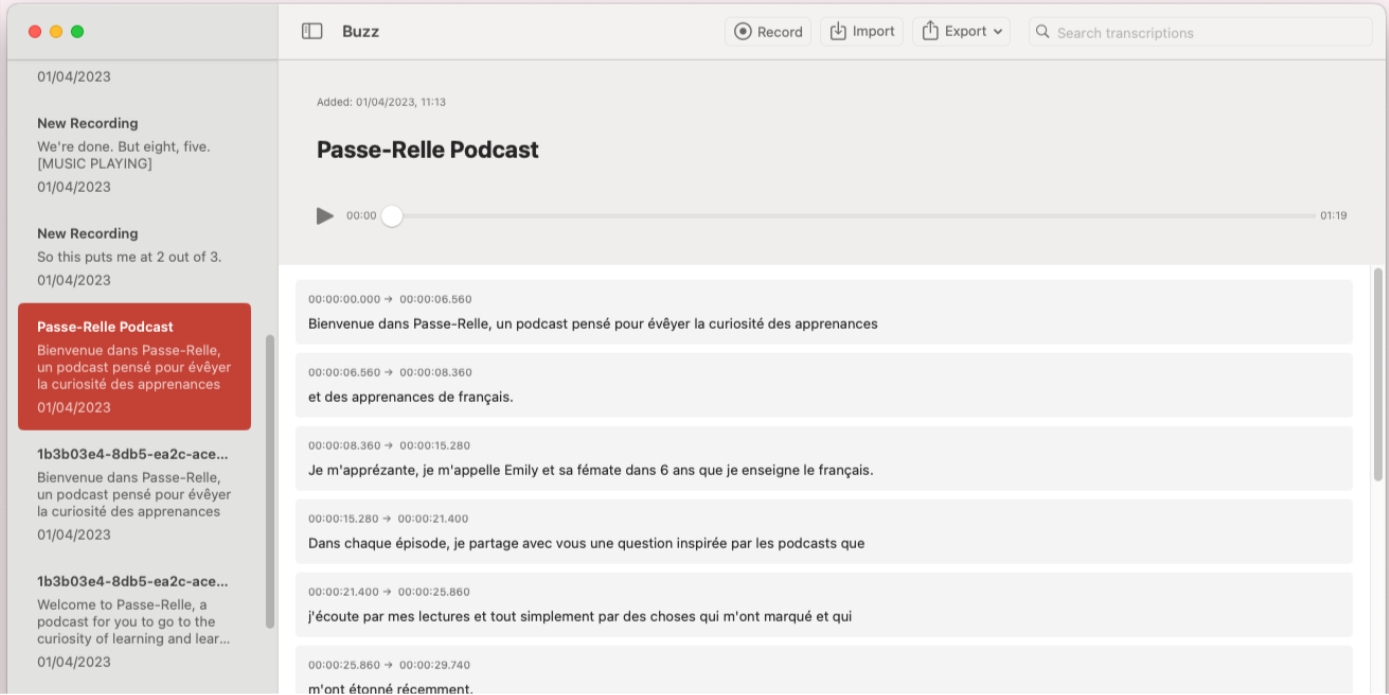
  • macOS build offers a native UI with search, playback, and inline editing

Pricing Tables

Open-Source Classic
Free
  • Full offline transcription and translation. 
  • Export to subtitle/text formats. 
  • No usage limits beyond hardware capacity.

Analytics

Traffic Analysis

Domain Rating
13
Organic Traffic
6000
Majority Users
United States

Visits Over Time

No visit data found.

Traffic Sources

No traffic data found.

Last Update Date: 2025-12-20

FAQ

Can Buzz Captions work without internet?
Yes — it runs locally on your computer and does not require an internet connection for core transcription tasks. (buzzcaptions.com)
Does it support subtitle exports?
Yes — you can export transcripts as SRT, VTT, CSV, and plain text formats. (buzzcaptions.com)
Are transcripts private?
Because all processing happens on your device, your audio doesn’t leave your machine, which improves privacy. (TOOLHUNT)
Is there a free version?
Yes — the open-source version is free. macOS builds may have costs linked to App Store distribution. (Reddit)
What languages are supported?
Whisper supports 90+ languages for transcription and translation. (buzzcaptions.com)
Can it transcribe directly from a microphone?
Yes — live mic transcription is supported, but performance depends on your hardware. (buzzcaptions.com)
Is it suitable for professional teams?
It’s excellent for individuals and privacy-focused users, but lacks team collaboration features typically found in cloud services.

Related AI Tools

ToyPal is a storytelling device that attaches to soft toys and delivers personalized AI-generated stories for children so
Kidgeni is a tool that creates AI-generated art, stories, and books for children so they can learn, create,
SermonGPT is a tool that generates sermon drafts and outlines for pastors, ministers, and speakers so they can
Lyrics Generator is an AI songwriting tool that creates lyrics for musicians, creators, and hobbyists so they can
Love Letter Generator is a tool that creates personalized romantic letters for couples and individuals so they can
AI Diary is a journaling tool that uses AI conversations, mood tracking, and writing analysis to help people