
DivMagic logo

DivMagic

Rating: 3.8/5
User Satisfaction: 70%
DivMagic is a tool that lets you copy design and code from any website element so you can convert it into HTML, CSS, React/JSX or Tailwind and reuse it in your projects.

Alternative To

Overview

 DivMagic is a browser extension (Chrome + Firefox) aimed at web developers/designers. It allows you to click on an element on any website and extract its HTML + CSS (and optionally convert that code into frameworks like Tailwind CSS or React/JSX) so you can reuse or adapt it. 

If you spend a lot of time re-creating UI components from design or other websites (cards, layouts, etc.), DivMagic aims to dramatically reduce that effort. You save from digging through DevTools individually, extracting styles, media queries, colors, etc. So it’s especially useful for: front-end developers, UI/UX engineers, agencies building many sites/components, and for rapidly prototyping.


You install the browser extension. On a target website you select an element (or capture a section/page). DivMagic extracts the relevant markup, style(s), media queries, and can convert into your chosen format (plain HTML/CSS, Tailwind classes, React/JSX). It also supports iframes, has DevTools integration, and a “studio” component library where you save and manage your copied items.

Details

Tool Launch / Founded Date

2022-23

Best for

Front-end developers, UI/UX engineers, agencies building multiple web pages/components, makers who reuse designs, developers using Tailwind or React who want to speed up conversion from static design/markup.

Access Type

Freemium/extension (install for free) with paid upgrades or lifetime deal. (Exact free-vs-paid features not fully transparent).

Licensing Model

Proprietary. The extension is closed-source (though there is a GitHub repo but likely example/extension; still check). (GitHub) Commercial reuse rights of output depend on your own terms; the tool extracts code, you must still verify your use is legal.

Feature

  • One-click element extraction (HTML + CSS) from any website element. 
  • Conversion of CSS into Tailwind CSS (including colours) even if the source site didn’t use Tailwind.
  • Conversion into React/JSX components.
  • Media query / responsive style support: capture responsive breaks.
  • Iframe support: can extract code from iframes.
  • DevTools integration & built-in “studio” to manage saved components. 
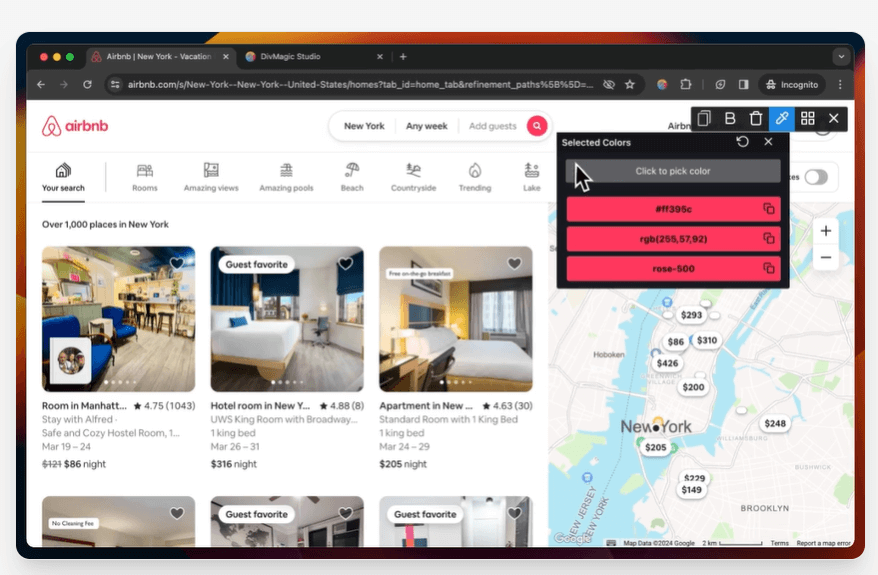
  • Additional “toolbox” utilities: color picker, font extraction, grid, etc.

Pricing Tables

Lifetime Access
$49 (one-time) (via deal platforms such as AppSumo)

includes all features, usage unlimited (within normal extension constraints) as of the deal.

Monthly Plan
$16/month

all features included (according to external sources)

Yearly Plan
$96/year ($8/month equivalent)

all features included.

Analytics

Traffic Analysis

Domain Rating
29
Organic Traffic
2720
Majority Users
United States

Visits Over Time

No visit data found.

Traffic Sources

No traffic data found.

Last Update Date: 2025-11-27

FAQ

Can I use the output commercially?
The tool gives you code extracted and converted. However you’re responsible for the legal right to reuse someone else’s design—DivMagic does not guarantee design-ownership transfer. If you modify and integrate the code into your own project, that’s typically fine, but always check IP/licensing for the source website.
How many elements/pages can I extract per month?
I did not find a published hard cap on usage. The licence appears to permit unlimited extraction (within extension constraints) for paid users. However, extension/browser limitations and performance may act as practical limits.
Can I edit or customise the output?
Yes. DivMagic offers a “studio” where you can save extracted components and edit them. You can also copy into your codebase and adapt manually.
Does it integrate with my workflow (React/Tailwind)?
Yes — it supports converting copied elements into Tailwind CSS and React/JSX format, helping developers working in those frameworks.
Does my content get used to train models / is my data safe?
There’s no indication that extracted code or your usage is fed into AI training models. Since it’s a browser extension operating locally, risk is lower. But always review privacy/terms if you’re handling sensitive corporate sites.
What do I get on the top plan vs entry plan?
Since the main plan appears to include “all features”, differentiation comes via licence type (single user vs team) and device/user count. For example, team plan offers shared component library, multiple users. But details are not super prominent on the main site—ask vendor for specifics.

Related AI Tools

Sidewalk Social is a tool that helps businesses create, schedule, and manage AI-assisted social media content so they
Questas is a tool that helps creators build AI-powered interactive stories with branching narratives, images, and videos so
Idea Generators is an AI brainstorming tool that generates content and business ideas for creators, marketers, and online
MissionMapper is a tool that helps individuals create personal mission statements and clarify their goals, values, and purpose
JimmyGPT is an AI chatbot tool that helps individuals chat, brainstorm, and get coding or writing assistance through
Dreamland Stories is a tool that helps kids create personalized AI-generated stories with images and narration so they

