
filmulator logo

Filmulator

Rating: 4.2
User Satisfaction: 84%
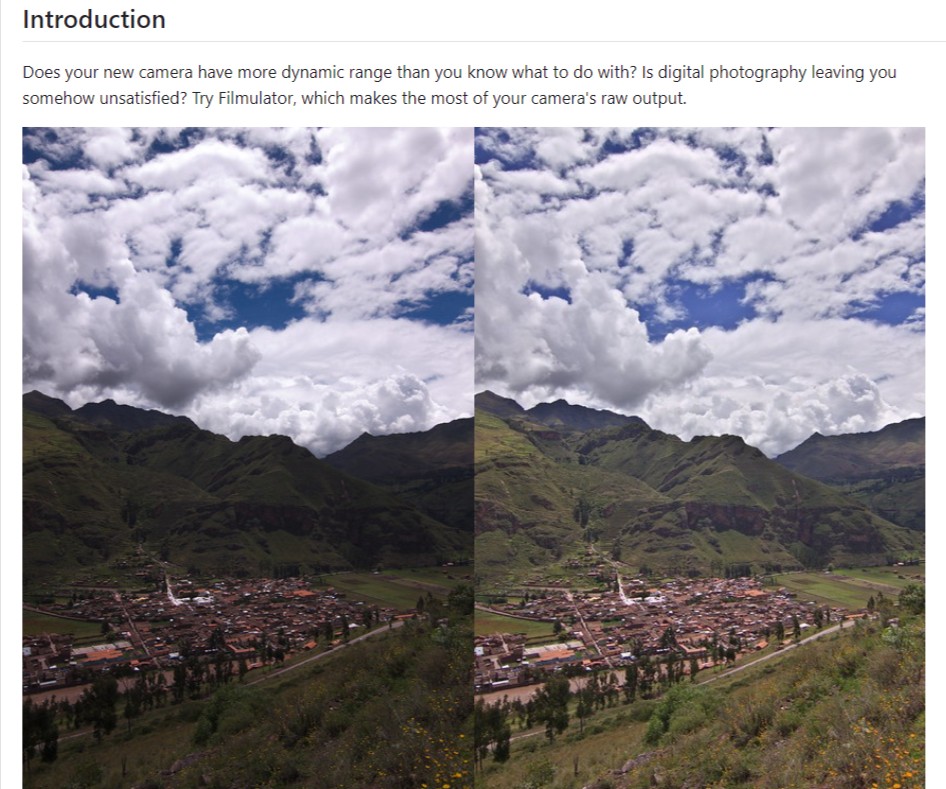
Filmulator is a photo editing tool that processes RAW images with a physics-based approach for photographers so they can recover highlights, manage contrast, and get natural, film-like results.

Alternative To

Overview

Filmulator is a desktop RAW photo editor built around a film-inspired processing model. Instead of piling on complex sliders, it focuses on how light interacts with film to produce cleaner highlights and smoother tonal transitions.

It runs locally on your computer (Windows, macOS, Linux) and is fully open source.

Many RAW editors struggle with harsh highlights and blown skies unless you spend time masking or tweaking curves. Filmulator is designed to handle that problem by default. It’s especially useful if you shoot high-contrast scenes, landscapes, or street photography and want natural results without a heavy editing workflow.

It’s also appealing if you want a free, privacy-friendly alternative to subscription photo editors.

Filmulator processes RAW files using a physics-based model of film exposure before applying tone mapping. This approach compresses highlights more gracefully and preserves midtone detail.

You get essential controls (exposure, contrast, saturation, sharpening) without overwhelming panels. The tradeoff: fewer advanced tools than full-scale editors like Lightroom. There’s no layer system, limited local adjustments, and the UI can feel utilitarian rather than polished.


Details

Tool Launch / Founded Date

2018-01-01 (approx.)

Best for

Independent photographers, hobbyists, landscape and street shooters, privacy-conscious users

Access Type

Free, open-source desktop software

Licensing Model

Open-source (GPL). You retain full rights to your images. No usage restrictions or watermarks.

Feature

  • Physics-based RAW processing for smoother highlight roll-off
  • Strong highlight recovery without complex masking
  • Film-like tone mapping by default
  • Non-destructive editing workflow
  • Runs fully offline on your computer
  • Supports common RAW formats
  • Free and open source with no subscriptions

Pricing Tables

Free
$0
  • Full access to all features
  • Unlimited photo edits and exports
  • No watermarks or usage limits
  • Optional donations support development

Analytics

Traffic Analysis

Domain Rating
31
Organic Traffic
126
Majority Users
United States

Visits Over Time

No visit data found.

Traffic Sources

No traffic data found.

Last Update Date: 2026-01-22

FAQ

Is Filmulator really free?
Yes. It’s completely free and open source. There are no paid plans, subscriptions, or locked features.
Can I use edited photos commercially?
Yes. You retain full ownership and commercial rights to all images you edit or export.
Does Filmulator upload my photos anywhere?
No. All processing happens locally on your computer. Nothing is uploaded or tracked.
What makes Filmulator different from Lightroom?
Filmulator focuses on highlight recovery and film-like tone mapping with fewer tools. Lightroom offers a much broader editing and asset-management system.
Does it support batch editing?
Basic batch processing is available, but it’s not optimized for large, high-volume workflows.
Is Filmulator good for beginners?
Yes, especially if you want strong results with minimal sliders. Advanced users may find it limiting.

Related AI Tools

Truth or Dare AI is a tool that generates personalized truth questions and dare challenges for friends, couples,
KidsAIStory is a tool that creates personalized illustrated children's books with AI for families and educators so they
Your Own Story Book is an AI storytelling tool that creates personalized illustrated storybooks for pet owners, families,
Tiny Stories is a tool that creates personalized storybooks from family photos for parents and gift-givers so they
MagicTales is a tool that creates personalized AI-generated storybooks from a child’s photo so families can give unique
MakeMyTale is a tool that creates personalized AI-generated stories for children so they can explore creativity, develop storytelling



