RelayThat logo

RelayThat

Rating: 4.5/5
User Satisfaction: 85%
RelayThat is a tool that helps marketers and small teams automate creation of branded graphics so they can produce social posts, ads, and marketing images quickly and consistently.

Alternative To

Overview

RelayThat is a web-based design automation platform. Instead of building each marketing graphic from scratch (posters, social media images, ads, headers, etc.), you input your brand assets — colors, logos, fonts — and RelayThat uses templates and “smart layouts” to automatically generate a variety of design options pre-sized for different channels.

If you run a small team, are a freelancer, agency, or content creator, you know how time-consuming and inconsistent design work can be. RelayThat dramatically cuts design time and helps maintain brand consistency: once your brand style is set, you can churn out multiple image formats (social, ads, print) without rediscovering a look each time. That saves effort and overhead — especially if you need many visuals across platforms and campaigns. 

  • You define brand assets (logo, colors, fonts).
  • Choose from hundreds or thousands of predefined “SmartLayouts.”
  • RelayThat auto-generates multiple layout variations sized appropriately for different formats (social, ads, banners, print). 
  • You can optionally tweak text, upload custom fonts or images, and pick from a built-in stock image library (3 million+ free images) for backgrounds/icons. 
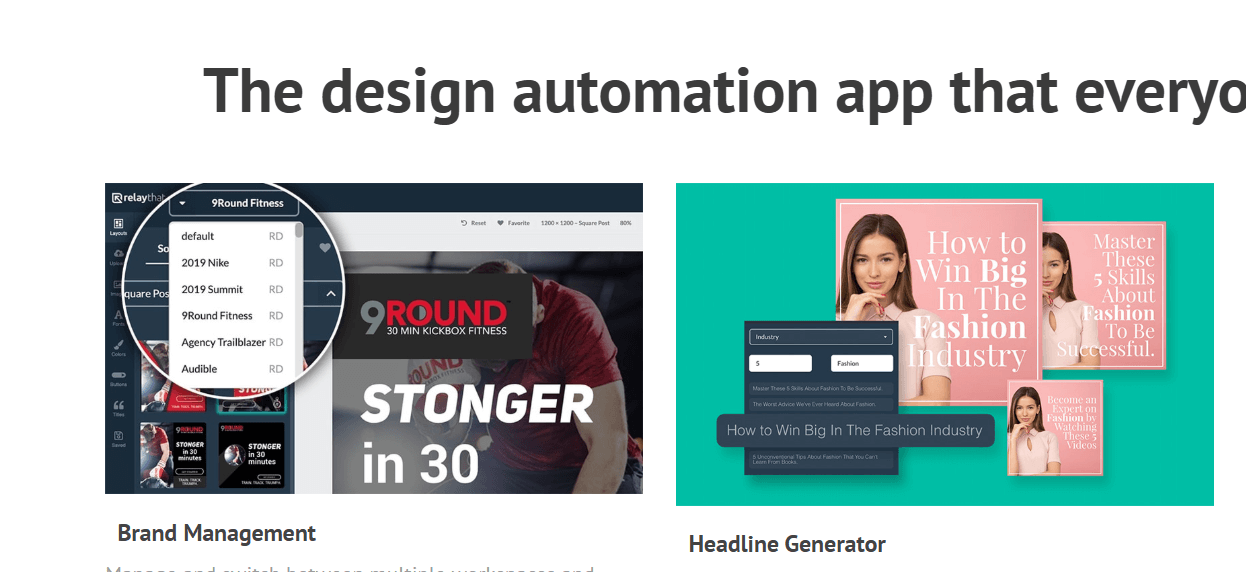
  • The system also includes a “headline generator,” color & font pairing suggestions, and brand management (workspaces, multiple campaigns) to keep assets and projects organized.

Details

Tool Launch / Founded Date

2025

Best for

Freelancers, small & medium-size businesses, marketing agencies, content creators, social-media managers, real-estate teams, startups needing frequent visual assets without a dedicated designer.

Access Type

Paid subscription per user.

Licensing Model

Proprietary software. Finished images can be used commercially or personally; no restrictions by RelayThat on how you use them. But you must own or have rights to any custom assets (photos, logos) you upload.

Feature

  • Auto-generate multiple branded design variants across formats with one setup. 
  • One-click resizing (“resize & remix”) to adapt designs for different social/ad/platform sizes. 
  • Built-in library of 3 million+ royalty-free images, icons, textures — usable without extra cost. 
  • Brand management via workspaces: keep fonts, colors, logos organized per brand or client. 
  • Headline generator to help produce text overlays (titles, captions) quickly. 
  • Pre-made “smart” layouts designed for marketing and high-conversion visuals — no design skill needed.

Pricing Tables

Pro
$15/month (per user

Access to full feature set (brand portal, layouts, one-click resizing, stock images, downloads)

Pro+
$25/month (includes 2 users)

All “Pro” features

Multi-user collaboration (team of 2

Enterprise
Contact Vendor

For larger teams or organizations needing team collaboration, data integration, white-label options, branded sign-in pages, etc.

Analytics

Traffic Analysis

Domain Rating
59
Organic Traffic
806
Majority Users
India

Visits Over Time

No visit data found.

Traffic Sources

No traffic data found.

Last Update Date: 2025-12-02

FAQ

Can I use the images I make with RelayThat commercially (for clients, ads, products)?
Yes. RelayThat does not restrict commercial use. You can export and use final images as you wish — but you must ensure any uploaded logos, images, or custom assets are rights-cleared.
Does RelayThat offer a free trial or freemium plan?
No — the vendor removed freemium or time-limited trials. You’ll need to start with a paid plan if you want to start using it.
Can I create custom-sized designs (e.g. unusual banner dimensions)?
Not currently. RelayThat only supports a fixed set of popular sizes for social media, ads, and print. Custom dimensions aren’t supported.
Is RelayThat suitable for teams / collaboration?
Yes — with the Pro+ plan you can have at least 2 users. For larger teams or enterprise needs (white-label, custom setups), RelayThat offers enterprise pricing on request.
Can I embed clickable links in exported images (e.g. for ads)?
No. As with all static images, you can’t embed working URLs. You’ll need to add links in the platform where you upload the image.
Is there a mobile or tablet app version?
No — current version is desktop-only (web-based). They do not have a mobile companion app at this time.
How flexible is the design editing? Can I tweak every element?
Compared to full design tools, editing is more limited. RelayThat emphasizes speed and consistency — you can choose layouts, fonts, upload assets, change text — but you don’t get full freedom to reposition or redesign layouts from scratch with ease. That’s by design to enforce brand consistency across variations.

Related AI Tools

Idea Generators is an AI brainstorming tool that generates content and business ideas for creators, marketers, and online
MissionMapper is a tool that helps individuals create personal mission statements and clarify their goals, values, and purpose
JimmyGPT is an AI chatbot tool that helps individuals chat, brainstorm, and get coding or writing assistance through
Dreamland Stories is a tool that helps kids create personalized AI-generated stories with images and narration so they
WriteMyEssay.ai is a tool that generates academic essays, outlines, and citations for students so they can draft papers
StoryHero is an AI storytelling tool that creates personalized illustrated stories for children so parents, teachers, and kids

