


Posting consistently on Facebook is easier when you can plan, schedule, and reuse content—without living inside the app. The tools below are the best free (or freemium) Facebook post schedulers for creators, freelancers, and small teams.
What is a Facebook Post Scheduler?
A Facebook post scheduler is a tool that lets you draft posts in advance and publish them automatically at a chosen date/time—often with extras like calendars, approvals, analytics, inbox/engagement, and cross-posting.
Benefits of Using a Scheduler
-
Save time by batching content weekly/monthly
-
Post consistently (even when you’re busy)
-
Reduce mistakes with previews + approvals
-
Improve performance with best-time scheduling + analytics
-
Manage multiple Pages from one dashboard
10 Free Facebook Post Schedulers
-
contentstudio.io
-
socialchamp.com
-
sproutsocial.com
-
socialpilot.co
-
loomly.com
-
sendible.com
-
publer.com
-
recurpost.com
-
planable.io
-
agorapulse.com
Comparison Table
| Tool | Website | Best for | Free option | Key strength | Main limitation |
|---|---|---|---|---|---|
| ContentStudio | contentstudio.io | Agencies + content workflows | ✅ Free trial | Strong workflow + publishing suite | No free-forever plan |
| Social Champ | socialchamp.com | Budget scheduling | ✅ Free plan | Free tier for light scheduling | Tight limits on free tier |
| Sprout Social | sproutsocial.com | Enterprise reporting/inbox | ✅ Free trial | Deep analytics + inbox | Trial only; premium pricing |
| SocialPilot | socialpilot.co | Multi-page SMBs/agencies | ✅ Free trial | Bulk scheduling + value at scale | Trial-based access |
| Loomly | loomly.com | Planning + approvals | ✅ Free trial | Great previews + collaboration | Trial-based access |
| Sendible | sendible.com | Agencies + client reporting | ✅ Free trial | Reporting + client workflows | Trial-based access |
| Publer | publer.com | Creators (freemium) | ✅ Free plan | Free-forever starter plan | Limits on accounts/posts |
| RecurPost | recurpost.com | Evergreen recycling (paid) | ✅ Free trial | Recurring libraries + recycling | No free plan (trial only) |
| Planable | planable.io | Approvals + collaboration | ✅ Free plan | Best review/approval flow | Free plan capped by total posts |
| Agorapulse | agorapulse.com | Scheduling + inbox | ✅ Free trial | Publishing + engagement management | Trial-based access |
1. ContentStudio (contentstudio.io)

Review: ContentStudio is a unified social media management platform that combines content planning, multi-channel scheduling/publishing, and performance reporting in one workspace. It is particularly positioned for brands and agencies that need approvals, client separation (workspaces), and repeatable publishing operations, and it is typically evaluated through a 14-day free trial.
Best For:
-
Agencies managing multiple client brands via separate workspaces
-
Teams needing structured collaboration and approvals before publishing
Key Features:
-
Multi-channel publishing & scheduling with calendar-based planning
-
Approval workflow and client/approver review capabilities
-
Tiered plans that scale into inbox/approvals/automation and higher limits
Pros:
-
Strong “agency + collaboration” orientation (workspaces, approvals, client review)
-
Clear plan ladder for scaling from small teams to agency-level operations
Cons:
-
No indication of a free-forever tier; ongoing use is subscription-based after the trial
Pricing:
-
14-day free trial (no credit card required)
2. Social Champ (socialchamp.com)

Review: Social Champ provides a functionally meaningful free-forever tier for light scheduling, making it a pragmatic entry point for individuals who want to maintain a consistent posting cadence without immediate subscription commitment. The free plan is explicitly defined by limits on connected accounts, users, and the number of scheduled posts per account.
Best For:
-
Individuals who are starting with basic social scheduling and a small number of profiles
-
Low-budget creators or small pages needing a simple, repeatable publishing routine
Key Features:
-
Scheduling with Smart Queues to systematise posting times
-
Core publishing workflow via calendar-based planning and posting tools
Pros:
-
Free plan available (no-cost entry for ongoing use)
-
Operationally straightforward for routine scheduling and queue-based publishing
Cons:
-
Free plan constraints: 3 social accounts, 1 user, and 15 scheduled posts per social account (you must wait for posts to publish to free up slots).
Pricing:
-
Free: $0
3. Sprout Social (sproutsocial.com)

Review: Sprout Social is a premium social media management platform recognised for robust analytics/reporting and a centralised engagement experience via its Smart Inbox. It is most appropriately evaluated through its 30-day free trial (no credit card required), and then adopted when the organisation can justify the ongoing per-seat cost through measurable workflow efficiency and reporting needs.
Best For:
-
Teams trialling an advanced unified inbox plus higher-level analytics/reporting
-
Organisations that require robust, stakeholder-ready reporting across profiles and campaigns
Key Features:
-
Publishing and scheduling (core content planning functionality)
-
Smart Inbox for consolidating messages/engagement into a single stream
-
Reporting and analytics (including plan-based reporting capabilities)
Pros:
-
High-quality reporting structure suitable for performance tracking and internal reporting
-
Mature engagement workflow through a unified inbox model
Cons:
-
No free-forever tier; access is trial-first and then subscription-based
-
Pricing is premium and per-seat, so costs scale quickly with team size
Pricing:
-
30-day free trial
4. SocialPilot (socialpilot.co)
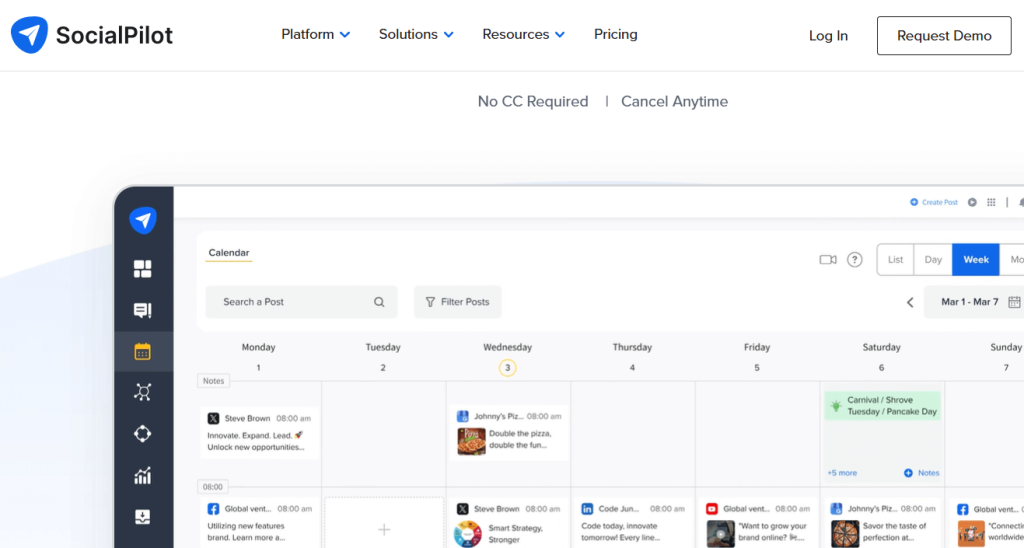
Review: SocialPilot is positioned as a cost-effective social media scheduling and management platform for SMBs and agencies, with particular emphasis on bulk scheduling and multi-account operations. It is typically evaluated through a 14-day free trial (no credit card required), after which adoption depends on whether the organisation needs scaled publishing capacity, approvals, and analytics.
Best For:
-
SMBs managing multiple Pages/profiles with a single scheduling workflow
-
Agencies scheduling at scale across many client accounts (with approvals/white-label needs on higher tiers)
Key Features:
-
Bulk scheduling (create and schedule up to 500 posts in a few clicks)
-
Multi-account publishing with plan-based account limits (e.g., 7/15/25/50 accounts across tiers)
-
Calendar + team workflows that expand by plan (team collaboration/manager approval; client approval on higher tiers)
Pros:
-
Strong multi-account scheduling orientation at comparatively accessible entry tiers
-
Clear agency-facing workflow expansion (client approval and white-label reporting on Premium)
Cons:
-
Evaluation is trial-based (no free-forever tier indicated on official pricing pages)
-
Collaboration/approval capabilities are plan-dependent, so required workflows may push teams into higher tiers
Pricing:
-
Free trial: 14 days (no credit card required).
5. Loomly (loomly.com)

Review: Loomly is a social media content calendar and publishing workflow platform designed for planning, collaboration, and approvals. Its near-native post previews and multi-level sign-off processes are intended to reduce posting errors and improve governance, and it is typically evaluated via a 15-day free trial (no credit card required).
Best For:
-
Content teams that need structured planning plus approvals before publishing
-
Agencies that require clear previews and client/stakeholder sign-off
Key Features:
-
Content calendar for planning, organising, and scheduling posts
-
Post previews/mockups that mirror platform UI to validate formatting before scheduling
-
Collaboration tools: multi-level approval workflows, feedback tracking, and post history
Pros:
-
Strong planning + review experience (calendar-first workflow with approvals)
-
High-value previews that reduce avoidable publishing mistakes
Cons:
-
Trial-based evaluation; ongoing access is subscription-based
-
Some workflow depth (e.g., approvals/roles) can be plan-dependent
Pricing:
-
15-day free trial
6. Sendible (sendible.com)

Review: Sendible is an agency-oriented social media management platform that combines scheduling and queue-based publishing with reporting and client-facing workflows (e.g., approvals, client dashboards, and scalable user/profile structures). It is commonly assessed via a 14-day free trial with no card required, then adopted when reporting depth and multi-client operations justify subscription costs.
Best For:
-
Agencies managing multiple client brands that need separated calendars/workspaces and repeatable publishing operations
-
Teams that require client-ready reporting and structured collaboration/approvals
Key Features:
-
Scheduling + Smart Queues for evergreen/recurring publishing (start/pause/edit queues)
-
Bulk publishing support (e.g., Bulk Import) and calendar-led planning
-
Reporting stack (including custom/automated reports on higher tiers)
-
Team permissions/workflows (user management, assignment & approval, client dashboards—plan dependent)
Pros:
-
Clear agency structure: collaboration + approval pathways and client-friendly visibility features
-
Strong scheduling workflow for multi-account environments (queues, bulk publishing, centralised compose)
Cons:
-
No free-forever tier; evaluation and ongoing use are subscription-based
-
Several “agency-grade” capabilities (e.g., automated/custom reports, expanded collaboration) are tier-gated, which can push teams to higher plans
Pricing:
-
14-day free trial
7. Publer (publer.com)

Review: Publer offers a genuinely workable free-forever baseline for individuals who want consistent, budget-friendly scheduling (including Facebook Pages), with clearly defined caps on connected accounts and scheduled posts per account.
Best For:
-
Solo creators and small Pages that need reliable, lightweight scheduling without immediate subscription costs
-
Freemium scheduling where “practical limits” are acceptable (e.g., a small set of brands/profiles)
Key Features:
-
Scheduling + calendar-based planning (Calendar Planner)
-
Multi-platform posting via broad integrations (e.g., Facebook, Instagram, LinkedIn, Google Business, TikTok; others supported)
-
Bulk scheduling (including CSV-based bulk options)
-
Collaboration primitives (Workspaces) with deeper workflows on paid tiers
Pros:
-
Free plan is explicitly “free forever,” suitable for long-term light use
-
The free tier includes 10 scheduled posts per account, which can sustain consistent posting if you rotate slots as posts publish
-
Publer also indicates free trials on paid features without requiring card details (useful for evaluating upgrades)
Cons:
-
Free tier limits include 3 social accounts, 1 user, and 10 scheduled posts per account
-
Twitter/X accounts cannot be connected on the free plan
-
Free plan retains only 24 hours of post history (as stated on the plans page)
Pricing:
-
Free: Free forever
8. RecurPost (recurpost.com)
Review: RecurPost is primarily positioned around recurring/evergreen scheduling via content libraries and recycling queues. It does not present a free-forever tier; instead, evaluation is typically conducted through its 14-day free trial (no credit card required), followed by subscription adoption if evergreen automation is a sustained need.
Best For:
-
Evergreen recycling workflows when you are ready to pay for ongoing automation
-
Content libraries and recurring queues (structured reuse of high-performing posts)
Key Features:
-
Recurring posts + content libraries (evergreen “recycle” capability)
-
Best-time scheduling (available on paid plans; usage limits vary by tier)
Pros:
-
Strong evergreen/recycling concept for maintaining consistency with limited new content production
Cons:
-
No free plan; access is trial-first and then subscription-based
Pricing:
-
14-day free trial (no credit card needed)
9. Planable (planable.io)

Review: Planable is built around collaboration-first publishing—draft → comment → approve → schedule—with highly visual mockups that help stakeholders review content exactly as it will appear before it goes live. Its free plan is unusually usable for teams because it is not time-limited; the primary constraint is the total number of posts you can create (50 total).
Best For:
-
Teams that require approvals, feedback loops, and clear accountability before publishing
-
Agencies coordinating with clients who need structured review and sign-off
Key Features:
-
Visual previews/mockups for review prior to scheduling
-
Comments, collaboration, and approval workflows (including multi-level approvals on Enterprise)
Pros:
-
Best-in-class review/approval workflow for reducing posting errors and back-and-forth communication
-
Free plan is not time-boxed, enabling realistic process testing at your own pace
Cons:
-
Free plan is capped by 50 total posts created (record-based; it does not reset and deleting posts does not restore capacity)
Pricing:
-
Free: 50 total posts
10. Agorapulse (agorapulse.com)

Review: Agorapulse integrates publishing (scheduling/calendar) with engagement management (a unified inbox), collaboration, and reporting—making it particularly suitable for ongoing community management. It is commonly evaluated through a flexible 30-day free trial (15 days + optional 15-day extension) with no credit card required, and it also offers a limited free plan for light use.
Best For:
-
Teams that want scheduling + inbox in a single platform
-
Community management workflows that require consistent engagement handling and coordination
Key Features:
-
Publishing workflow with scheduling (advanced publishing features vary by plan)
-
Engagement inbox (with higher-tier capabilities such as Inbox Assistant/Saved Replies being plan-dependent)
-
Reporting/analytics (free plan reporting is limited; broader reporting is available on paid plans)
-
Team collaboration during trial and on paid tiers (additional members can be invited during trial)
Pros:
-
Strong pairing of publishing + engagement (useful for operational social media management, not only posting)
-
Trial design is practical for evaluation: 30 days total, no card, with access aligned to the Advanced plan (with temporary trial limits)
-
Transparent pricing-per-user model with clear plan ladder
Cons:
-
Trial-based evaluation remains the main route to testing full capabilities; many advanced workflows are tier-gated
-
The free plan is tightly constrained (e.g., limited profiles/scheduled posts/inbox sync), which can restrict real-world team use
Pricing:
-
Free plan
How to Choose the Best One
-
If you only care about Facebook scheduling: Start with a lightweight tool like buffer.com or a collaboration tool like planable.io.
-
If you want approvals and teamwork: planable.io or loomly.com.
-
If you want evergreen recycling: socialbee.io.
-
If you manage multiple client Pages: socialpilot.co or sendible.com.
-
If you want scheduling + inbox: agorapulse.com.
-
If you want to test a pro suite: hootsuite.com or sproutsocial.com (via trial).
FAQs
What’s the best truly free Facebook scheduler?
If you want a permanent free option, buffer.com, publer.io, and planable.io offer free tiers (with limits).
Can I schedule posts on a Facebook Page for free?
Yes—most of the tools above support Facebook Page scheduling on free plans or trials, depending on the platform.
Do these tools work for personal Facebook profiles?
Most schedulers focus on Facebook Pages (and sometimes Groups). Personal-profile scheduling is often restricted by Facebook policies.
Which tool is best for small teams with approvals?
planable.io and loomly.com are strongest for review/approval workflows.
Which tool is best for agencies managing many pages?
socialpilot.co and sendible.com are agency-friendly (bulk scheduling + reporting), but often start via trials.

