
Obsidian logo

Obsidian

Rating: 4.4/5
User Satisfaction: 85%
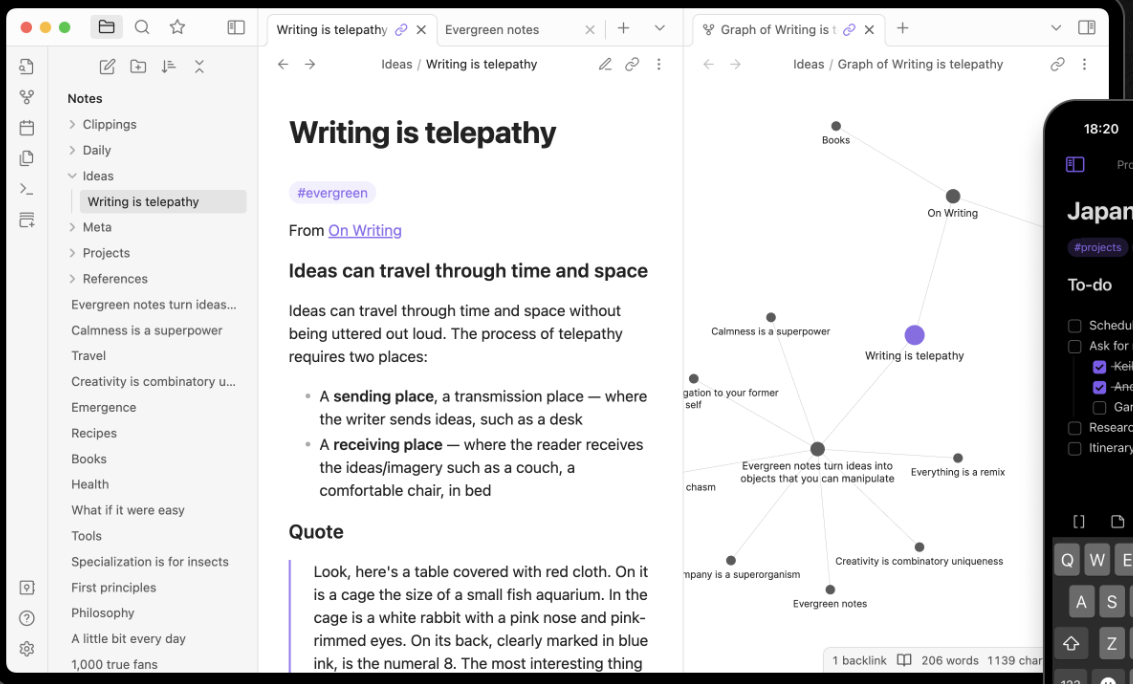
Obsidian is a tool that lets you build a network of interlinked Markdown notes so you can capture ideas, link them, and explore your thinking.

Overview

Obsidian is a cross-platform application (desktop + mobile) for taking Markdown-based notes, building a personal knowledge base, and linking ideas in a flexible way. It stores your notes as plain text files in a folder (called a “vault”).

If you often capture ideas, research, fragments, thoughts and want them to connect (rather than remain isolated), Obsidian shines. You get local-file ownership (so you keep your data), links between notes, a graph view of connections, and a rich plugin ecosystem for customizing workflows. Many users find it especially good for “second-brain” thinking, creatives, researchers, and power note-takers. 

You install Obsidian on your device, point it at a folder of Markdown files (or create one), and start creating notes. You can link notes by typing [[Note Name]], browse a visual graph of your notes and connections. You can install community plugins/themes to add functionality (e.g., Kanban boards, calendars, templates). Core features are free. There are optional premium services: sync across devices with encryption (Obsidian Sync) and publish your vault to the web (Obsidian Publish).

Details

Tool Launch / Founded Date

30 March 2020.

Best for

Personal note-taking, knowledge-base building, journaling, project management — especially when you want Markdown files stored locally, linking between notes, graph visualisations.

Access Type

Downloadable desktop/mobile applications; free use without account. Data stored locally by default; optional cloud services.

Licensing Model

Freemium model: the core app is free for personal and (since Feb 2025) commercial use. Optional paid licences or services: e.g., “Catalyst” one-time to support development + early access, “Commercial” licence (though now optional), and paid cloud services (Sync, Publish).

Feature

  • Rich linking between notes (bidirectional links) and graph visualization of your knowledge.
  • Local Markdown files: you own your data, can move/manipulate without being locked in.
  • Cross-platform: Windows, macOS, Linux, iOS, Android. 
  • Plugin and theme ecosystem: Extend functionality to match your workflow (task boards, calendar, templates, etc.). 
  • Optional secure sync (end-to-end encryption) and version history of vaults. 
  • Very flexible: you can use it simply (just note taking) or deeply (knowledge management, Zettelkasten, research linking).
  • Publish service: turn your vault into a website without major technical know-how.

Pricing Tables

Free (core)
$0
  • Use the desktop/mobile apps, create unlimited notes, link them, use local files — no time-limit.
  • Optional add-ons cost extra.
Sync
$4 USD/user/month (billed annually) or $5 USD/user/month (monthly)
  • End-to-end encrypted sync across devices
  • Version history
  • Shared vaults (collaboration)
  • (Annual billing is cheaper)
Publish
$8 USD/site/month (billed annually) or $10 USD/site/month (monthly)
  • Publish your vault as a website
  • Custom themes, graph & full-text search for published site

Analytics

Traffic Analysis

Domain Rating
84
Organic Traffic
314554
Majority Users
United States

Visits Over Time

No visit data found.

Traffic Sources

No traffic data found.

Last Update Date: 2025-11-15

FAQ

Can I use Obsidian commercially or for my company?
Yes — the core app is free for both personal and commercial use. The premium services (Sync/Publish) are optional.
How many notes / vaults / devices can I have?
With the free core app you can have unlimited local vaults/devices (you just manage files). If you use Obsidian’s Sync service, features and limits depend on the plan (e.g., number of vaults, storage size).
Can I edit and customize what the tool generates?
Yes. Because your notes are plain Markdown files you can edit freely. You also can install themes/plugins for customization and modify your vault structure.
Does it integrate with other tools/workflows?
Yes in many ways: you can link/export Markdown, use community plugins for e.g., calendar/task, integrate with sync services or file-folder sync you already use. But integration is not always plug-and-play for team real-time collaboration like Google Docs.
Will my content be used to train machine-learning models or shared publicly by default?
No — notes are stored locally by default; using Obsidian’s sync/publish services you opt-in. For Sync the data is end-to-end encrypted.
What do I get on the paid plan that I don’t get on the free?
On Sync: encrypted cross-device syncing, version history, shared vaults. On Publish: hosting your vault as a website with custom domain, etc. Free tier gives you full note-taking capability with local files, linking, graph view, mobile/desktop apps.
How steep is the learning curve?
If you’re familiar with Markdown, linking ideas and customizing tools, you’ll feel comfortable. If you prefer a “just open and write” app with minimal setup, you may find there’s configuration needed to get the most out of Obsidian.

Related AI Tools

JimmyGPT is an AI chatbot tool that helps individuals chat, brainstorm, and get coding or writing assistance through
Dreamland Stories is a tool that helps kids create personalized AI-generated stories with images and narration so they
WriteMyEssay.ai is a tool that generates academic essays, outlines, and citations for students so they can draft papers
StoryHero is an AI storytelling tool that creates personalized illustrated stories for children so parents, teachers, and kids
MindChat is a mental wellness and concussion monitoring platform that combines AI assessments with EEG data for clinicians,
FanFicGen is a tool that generates AI-written fan fiction stories for fandom creators so they can brainstorm plots,

