
UpNote logo

UpNote

Rating: 4.5/5
User Satisfaction: 88%
UpNote is a tool that lets you write, organize, and sync notes across devices so you can capture ideas, tasks or research quickly and access them anywhere.

Alternative To

Overview

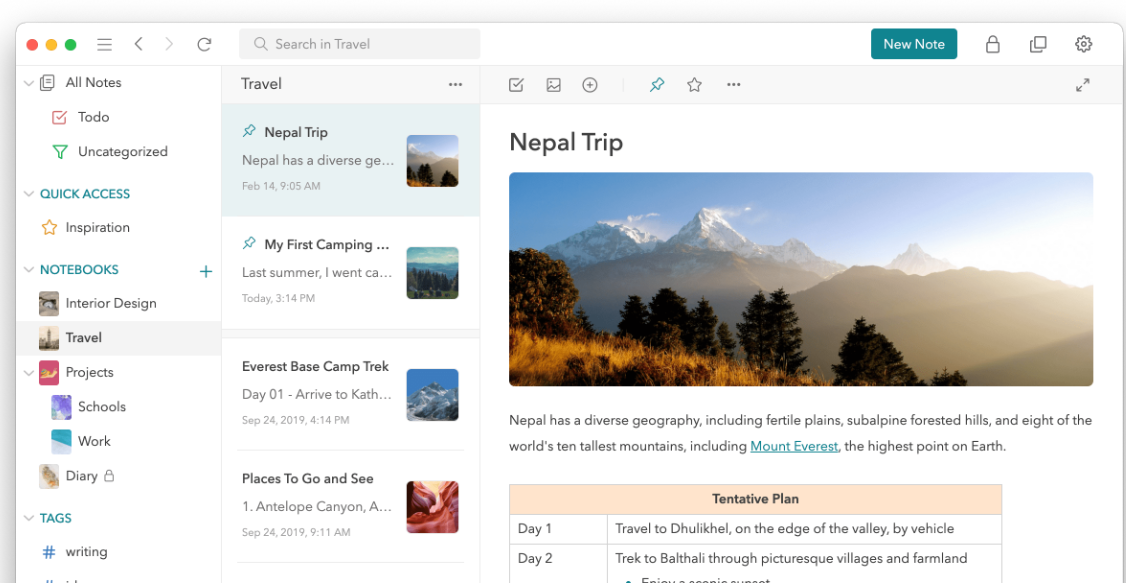
UpNote is a note-taking and personal knowledge management app that works across almost all major platforms (Windows, macOS, Linux, iOS, Android). It lets you create notes, organize them in notebooks/tags/spaces, and sync across devices — or keep them local if you prefer. 

If you value a clean, distraction-free workspace but need more power than a bare text note, UpNote bridges the gap: it’s richer than simple memo apps but lighter and more intuitive than heavyweight productivity suites. For people who jot ideas, manage tasks, keep journals, or build a “second brain,” it helps you organize and retrieve info without friction.

  • You can write and format notes with rich text, markdown, tables, code blocks, checklists, collapsible sections, attachments, etc. 
  • Notes can be grouped in notebooks (with nested structure) + spaces, and tagged with hashtags for flexible categorization; you can pin notes or use quick-access for important items.
  • Syncing works via cloud (when signed in) to keep notes updated across devices — or you can skip sign-in and keep notes local. 
  • You can export notes (or entire notebooks) to formats like Markdown, PDF, HTML, or plain text — useful for backup, migration, or external sharing.

Details

Tool Launch / Founded Date

2017

Best for

Solo creators, students, writers, researchers, professionals who want a clean, minimal note editor; people switching from heavier tools (Evernote/OneNote) but wanting a simpler, elegant option.

Access Type

Freemium — free basic version; paid Premium option.

Licensing Model

Proprietary software; you own your notes. No public spec showing as open source.

Feature

  • Rich text & Markdown support — bold, italics, code blocks, tables, checklists, attachments, links. 
  • Nested notebooks, tags/hashtags, spaces — flexible organization. 
  • Cross-platform sync (or local-only mode) — Windows, macOS, Linux, iOS, Android. 
  • Export/import — you can export notes or notebooks as Markdown, PDF, HTML, text; import from other apps (for example, imports from Evernote data) supported. 
  • Collapsible sections — helpful for long notes / outline style writing. 
  • Focus / distraction-free writing mode, typewriter mode, clean UI & themes — nice for writing, journaling, or long-form notes.
  • Lock / privacy feature (in Premium) — ability to lock notebooks or the entire app for privacy.

Pricing Tables

Free
$0
  • Up to 50 notes total
  • Basic note-taking and sync/basics across devices
Premium
$1.99/month
  • Unlimited notes
  • Add attachments, tables, code blocks, etc.
  • Lock notes / notebooks
  • Themes & custom notebook covers
  • Export to text, PDF, HTML, Markdown
Premium
$39.99 (Lifetime purchase)

Same feature set as monthly Premium: unlimited notes, attachments & formatting, locking, export, themes, sync across all devices.

Analytics

Traffic Analysis

Domain Rating
51
Organic Traffic
17.7K
Majority Users
United States

Visits Over Time

No visit data found.

Traffic Sources

No traffic data found.

Last Update Date: 2025-12-04

FAQ

Can I use UpNote for free indefinitely?
Yes — the free plan remains usable indefinitely, but it's limited to 50 notes. If you need more notes or advanced features, you need to upgrade.
Are my notes private / secure?
Yes — UpNote states they do not sell or share your note content. When you sync, data is stored via cloud (Firebase), encrypted in transit and at rest. But it is not end-to-end encrypted for maximum privacy.
Can I access my notes offline?
Yes — UpNote works offline. Notes you create or edit while offline sync when you reconnect.
Can I export or backup my notes easily?
Yes — you can export individual notes or entire notebooks to Markdown, PDF, HTML, or plain text formats. That makes backup or migration to another app straightforward.
Does UpNote support importing from other note apps?
Yes — there is import support from at least Evernote (via .enex) and possibly other note apps, helping you migrate easily.
Is UpNote good for collaborative notes / team use?
Not particularly. UpNote is designed primarily for individual use. It doesn’t have heavy collaboration, sharing, or workspace features like some other tools do.
What happens if I cancel or skip upgrade — will I lose notes?
No. Your existing notes remain accessible. But if you exceed the free-plan limit (50 notes) or want advanced features (attachments, locking, export, etc.), you’ll need Premium.

Related AI Tools

FictionGenie is a tool that generates stories, plots, and creative writing prompts for writers so they can draft
Logolept is a tool that expands your ideas into structured writing for creators so they can generate content
DoodleTale is a tool that turns kids’ drawings into AI-generated stories so they can create, learn, and play
PopStory is a tool that generates branded stories and marketing content using AI for creators and businesses so
Story Legend is a tool that generates and develops stories using AI for writers and creators so they
TaleStitch is a tool that helps writers create structured stories with AI guidance so they can develop plots,

