
Zim Wiki logo

Zim Wiki

Rating: 4.3/5
User Satisfaction: 88%
Zim Wiki is a desktop note-taking tool that organizes your content as a local wiki so you can manage ideas, tasks, and documents in plain text without cloud lock-in.

Alternative To

Overview

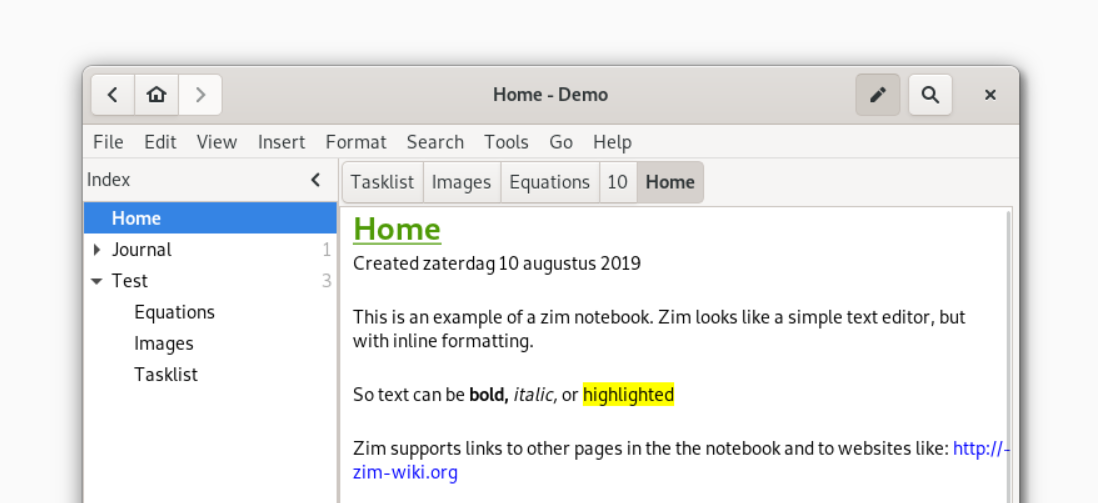
Zim Wiki is a desktop app that works like a personal wiki. Each “page” is a text file stored in a simple folder structure, and you can link pages together to build a knowledge base. It’s open source, lightweight, and runs offline. If you like the flexibility of plain text but want structure and a GUI editor instead of a raw markdown tool, Zim sits in the middle.

Zim helps you organize large amounts of information without a database or cloud dependency. Writers use it for documentation and research notes. Developers use it for personal knowledge bases and project planning. Anyone who prefers local, human-readable files over SaaS platforms will find it valuable. It reduces friction because everything is in folders you control, and export options make it easy to publish or share your notes.

You create notebooks that store pages as plain text files (with Zim’s wiki syntax). The editor supports formatting, checklists, images, attachments, and page linking. Plugins add features such as task lists, a calendar, equation editing, version control integration (Git/Bazaar), spellchecking, and HTML export.

Because it’s desktop-only, syncing requires your own setup (Git, Syncthing, Dropbox, etc.). There’s no official mobile app, and collaboration is manual. Some plugins are aging, and interface polish isn’t its main strength. But for users wanting full data ownership and a stable local wiki, Zim is reliable and mature.

Details

Tool Launch / Founded Date

2008-01-01

Best for

Writers, researchers, engineers, Linux users, privacy-minded note-takers, and anyone who prefers local plain-text control over cloud apps.

Access Type

Free, open-source desktop software.

Licensing Model

Licensed under GPL v2. You fully control your local data. Notes are plain text files with no vendor lock-in.

Feature

  • Local personal wiki with page linking and hierarchical notebooks.
  • GUI editor with formatting, lists, images, and attachments.
  • Stores content as plain text files for full control and portability.
  • Plugin system for tasks, equations, spellcheck, version control, calendar, and more.
  • Export to HTML, Markdown, LaTeX, and other formats.
  • Version control integration to manage changes and sync notebooks.
  • Cross-platform support (Linux native, Windows/macOS builds available).
  • Works fully offline; no cloud requirement.

Pricing Tables

Zim Wiki is free
$0

 There are no tiers, subscriptions, or paid upgrades.

Analytics

Traffic Analysis

Domain Rating
60
Organic Traffic
191
Majority Users
United States

Visits Over Time

No visit data found.

Traffic Sources

No traffic data found.

Last Update Date: 2025-12-06

FAQ

Is Zim Wiki fully free?
Yes. It’s open source under the GPL v2 license and costs nothing to use. You can modify it, extend it, and keep all data locally.
Can I sync my Zim notes across devices?
Not natively. You can sync the folder using Git, Dropbox, Syncthing, or any file-sync tool. Just keep in mind that simultaneous editing may create conflicts.
Does it work on macOS and Windows?
Yes, but Windows and macOS builds are community provided. The Linux version is the most stable.
Can I use Zim for documentation or publishing?
Yes. It has strong export options: HTML, Markdown, LaTeX, and more. Many users build entire documentation sites from Zim notebooks.
Does Zim train on my data?
No. Everything is local and offline. Nothing is uploaded or tracked.
Does it support attachments and images?
Yes. You can insert files, images, and links to local content. They’re stored alongside your notebook.
What’s missing compared to modern note apps?
No mobile client, no integrated sync, basic UI, and limited collaboration features. It prioritizes stability and local control over big cloud features.

Related AI Tools

Idea Generators is an AI brainstorming tool that generates content and business ideas for creators, marketers, and online
MissionMapper is a tool that helps individuals create personal mission statements and clarify their goals, values, and purpose
JimmyGPT is an AI chatbot tool that helps individuals chat, brainstorm, and get coding or writing assistance through
Dreamland Stories is a tool that helps kids create personalized AI-generated stories with images and narration so they
WriteMyEssay.ai is a tool that generates academic essays, outlines, and citations for students so they can draft papers
StoryHero is an AI storytelling tool that creates personalized illustrated stories for children so parents, teachers, and kids

