OBS logo

OBS Studio

Rating: 4.6
User Satisfaction: 88%
OBS Studio is a tool that enables creators, educators and live-streamers to capture and broadcast video and audio so they can record lessons, stream gameplay or run webinars.

Alternative To

Overview

OBS Studio is a free, open-source application for video recording (screen capture, webcam, etc.) and live streaming (to platforms like YouTube, Twitch, Facebook). It runs on Windows, macOS and Linux. 

If you need to capture video or broadcast live—whether for gameplay, tutorials, teaching, or webinars—OBS gives you a robust toolset without licensing fees or watermarks. Because it’s open-source, you avoid vendor lock-in and you can extend via plugins. Many creators use it as the backbone of their production workflows. 

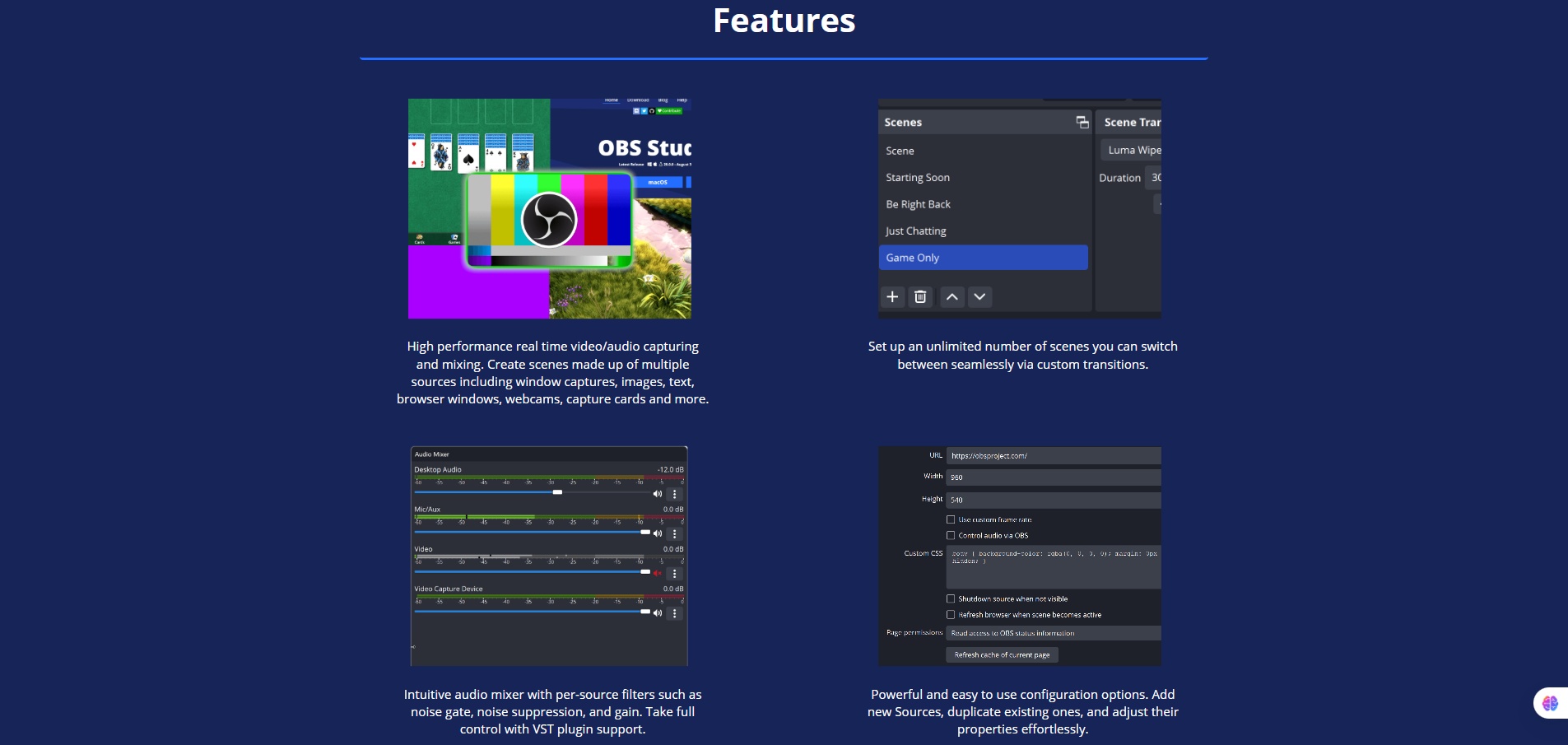
You set up “scenes” (layouts) composed of “sources” (windows, webcam, images, browser windows, capture cards). You can switch scenes with transitions. There’s an audio mixer with filters (noise gate, suppression, gain). You can stream to any RTMP-compatible service or record to disk.

Details

Tool Launch / Founded Date

Approx. 2012-08–09 (the original OBS)

Best for

Solo creators, educators, small teams, live streamers, game streamers, webinar hosts who need professional tools without cost

Access Type

Free download (no subscription)

Licensing Model

Proprietary project? Actually: open-source under GNU GPL v2 (or later) license. (GitHub) You can use it for commercial work; no watermarks or hidden fees.

Feature

  • Real-time video/audio capture and mixing: multiple sources (window capture, webcam, browser, images) in one production.
  • Unlimited scenes with seamless switching and custom transitions. 
  • Audio mixer with per-source filters (noise gate, suppression, gain) and VST plugin support. 
  • Modular UI (you can rearrange panels, pop out docks) for flexible workspace.
  • Cross-platform: Windows (10 & 11), macOS (12+), Linux. 
  • Supports many streaming platforms and any service with RTMP output.
  • Extensible via plugins and scripts (community ecosystem).

Pricing Tables

Free
$0
  • Fully functional software, no subscription required.
  • No watermarks or feature restrictions.
  • You handle your own streaming/recording destination.

Since it’s free/open source, there are no paid tiers from the OBS Project itself.

Analytics

Traffic Analysis

Domain Rating
88
Organic Traffic
2647734
Majority Users
United States

Visits Over Time

No visit data found.

Traffic Sources

No traffic data found.

Last Update Date: 2025-11-21

FAQ

Can I use OBS Studio commercially (for paid streams or business webinars)?
Yes — OBS is open-source under the GPL, and there are no inherent restrictions or watermarks. You’re free to use it in commercial contexts.
How many streams or recordings can I make per month?
There’s no enforced limit by OBS itself — the limit is your hardware performance and your streaming/recording platform capacity (internet bandwidth, CPU/GPU).
Can I edit the output (e.g., switch scenes, add overlays, transitions)?
Yes — you can set up scenes, sources, transitions, overlays, and switch live or during recordings. You can also apply filters to audio/video.
Does OBS integrate with other tools (e.g., streaming platforms, webinars)?
Yes — it supports streaming to any service accepting RTMP, and there are plugins and tools for further integrations (e.g., chat overlays, alert systems).
Is my content used to train AI or distributed by the company?
No — OBS is software you run locally; the project does not process your content in the cloud nor use it for training.
What support do I get if I run into issues?
There is a community support forum, Discord, knowledge base on the official site. Since it's open-source and volunteer-driven, you may not have guaranteed SLA as you would with a paid service.
If I’m on the free tool, what do I miss compared to paid tools?
You don’t pay for OBS, and it provides advanced features already. What you “miss” is things like built-in cloud production workflows, dedicated customer support, or bundled services some commercial tools offer — you’ll manage more of the setup yourself.

Related AI Tools

Youbooks is a tool that generates long-form nonfiction books from your ideas, sources, and writing style so you
EbookMaker is an AI-powered tool that creates eBooks and audiobooks for authors, marketers, and creators so they can
Automateed is a tool that creates and publishes AI-assisted books, courses, audiobooks, and digital products for authors and
FlipHTML5 is a digital publishing tool that converts documents into interactive flipbooks for creators, publishers, marketers, and businesses
FastMode is a tool that converts AI-generated websites into editable CMS-driven websites for developers and creators so they
NorthPole.Direct is a tool that creates personalized AI-generated letters from Santa for families so they can create memorable