

Trello is one of the most popular project management tools that provides a simple, visual way to organize tasks using Kanban boards. It’s beloved for its ease of use and flexibility, making it a top choice for small teams and individuals alike. However, despite its many advantages, some teams may find Trello’s features limiting, especially as they grow or need more advanced functionalities. Whether it’s due to cost, missing features, or the need for enhanced customization, there are several free alternatives to Trello that can provide the features you’re looking for without the associated costs. In this article, we will review the best free alternatives to Trello, with a focus on tools that offer flexible task management, Kanban boards, collaboration features, and integrations. We’ll compare their features, pros, cons, and pricing to help you find the right solution for your team.
Why Consider a Trello Alternative?
While Trello excels in its simplicity, some teams may outgrow it as their needs become more complex. Here are some common reasons businesses seek Trello competitors:
- Limited Features: Trello’s free plan offers essential task management features but lacks advanced project tracking, reporting, and integrations.
- Customization Needs: Teams looking for more customization options or complex workflows might find Trello’s Kanban system too rigid.
- Scalability: As businesses grow, Trello may not be sufficient to manage larger teams, multiple projects, or complex workflows.
- Cost: While Trello is free to use, its paid plans can get expensive for teams that need additional features.
This article explores 15 free alternatives to Trello, helping you decide which platform works best for your business needs.
15 free alternatives to Trello
Comparison Table of Trello Alternatives
| Product | Best For | Price Range | Key Features |
|---|---|---|---|
| KanbanFlow | Lean Kanban with built-in Pomodoro time tracking | Free, Paid plans start ≈ $5/user/mo | Kanban boards, WIP limits, Pomodoro timer, time reports |
| Hive | Modern teams needing multiple project views & AI assist | Free, Paid plans start ≈ $5/user/mo | Kanban, Gantt, calendar, chat, AI assistant |
| WeKan | Self-hosted open-source Kanban with full data control | Free (Open Source) | Kanban boards, lists, cards, labels, self-hosting |
| MeisterTask | Simple visual Kanban with automation & time tracking | Free, Paid plans start ≈ $13/user/mo | Kanban boards, templates, automation, basic time tracking |
| Fondue (Kanbanize) | Lean & agile analytics-heavy Kanban | Free tier, Paid plans (SMB–enterprise) | Kanban boards, flow analytics, WIP limits, automation |
| Ora | All-in-one Kanban, time tracking, chat & reporting | Free, Paid plans start ≈ $10/user/mo | Kanban, Gantt, time tracking, chat, reports |
| Kanboard | Minimalist open-source Kanban for self-hosting | Free (Open Source) | Kanban boards, WIP limits, search & filters, plugins |
| ZenTao | Agile software teams needing Scrum, Kanban & QA tools | Free community, Paid business plans | Scrum, Kanban, bug tracking, test management |
| Taiga | Agile teams using Scrum or Kanban | Free plan, Paid plans for larger teams | Scrum & Kanban boards, sprints, backlog |
| Nuclino | Knowledge + docs + Kanban in one workspace | Free, Paid plans start at $6/user/mo | Docs, real-time collaboration, Kanban views |
| Favro | Product & game teams needing boards + roadmaps | Free plan, Paid plans start ≈ $10.20/user/mo | Kanban, backlogs, roadmaps, automation |
| Yodiz | Agile teams with Scrum, Kanban & issue tracking | Free for small teams, Paid from ≈ $3–5/user/mo | Scrum, Kanban, backlog, issue tracking |
| Planka | Elegant self-hosted Trello-style Kanban | Free (Open Source) | Kanban boards, lists, cards, real-time sync |
| Twproject | Full project management with time tracking & Gantt | Free plan, Paid from ≈ $4.89–$6/user/mo | Tasks, time tracking, Gantt, resource management |
| List’d | Personal task lists & simple board-based planning | Free | Simple boards, personal to-dos, lightweight planning |
15 free alternatives to Trello Reviews
1. KanbanFlow
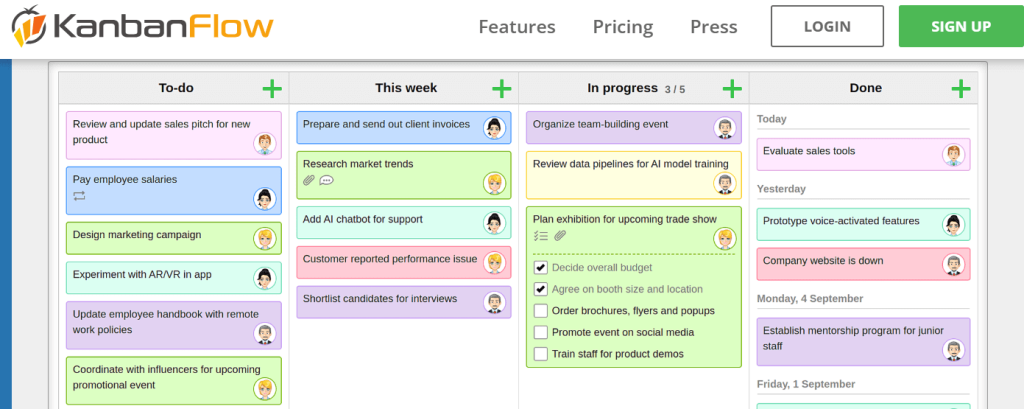
Best For: Lean Kanban with integrated Pomodoro time tracking
Review:
KanbanFlow is a lean project management tool built around visual Kanban boards and real-time collaboration. It stands out by combining Kanban with the Pomodoro Technique, letting you track focused work sessions directly from your board.
Features:
-
Kanban boards with WIP (work-in-progress) limits
-
Unlimited boards and tasks on the free plan
-
Subtasks, filters, recurring tasks, swimlanes
-
Stopwatch & Pomodoro timers with statistics
-
Time spent reports and basic analytics
Pros:
-
Excellent for focus and time management
-
Free plan is generous for individuals and small teams
-
Simple, clean interface
Cons:
-
Limited integrations on the free tier
-
Reporting and advanced features require the premium plan
Pricing: Free plan available; paid plans start at around $5/user/month.
2. Hive

Best For: Teams needing multiple views (Kanban, Gantt, table, calendar) plus collaboration
Review:
Hive is a modern project management and collaboration platform that gives teams many ways to view their work: Kanban, Gantt, timeline, table, and calendar views. It also includes built-in chat, notes, and an AI assistant (“Buzz”) to help with tasks and project setup.
Features:
-
Kanban, Gantt, timeline, table, list, and calendar views
-
Summary and portfolio overviews
-
Native chat, Zoom and Slack integrations
-
Automation, templates, and AI assistant
Pros:
-
Extremely flexible project views
-
Good fit for cross-functional teams and agencies
-
Built-in collaboration tools reduce app switching
Cons:
-
Gantt and some advanced features are on paid plans
-
Can feel heavy for very simple workflows
Pricing: Free plan available; paid plans start at about $5/user/month.
3. WeKan (Open Source)

Best For: Self-hosted Trello-style boards with full data control
Review:
WeKan is a completely open-source, free Kanban board application and a classic Trello-style alternative. You can self-host it on your own server, giving you full control over data, security, and customization.
Features:
-
Boards, lists, and cards with drag-and-drop
-
Labels, checklists, due dates, attachments
-
User permissions and multiple boards
-
Responsive web interface
Pros:
-
100% free and open source (MIT license)
-
Self-hosting for privacy-conscious teams
-
Good Trello-like experience with familiar layout
Cons:
-
Requires server setup and maintenance
-
Fewer polished integrations than commercial tools
Pricing: Free (open source); hosting costs depend on your server.
4. MeisterTask (Free Plan)
Best For: Simple visual task management for small teams
Review:
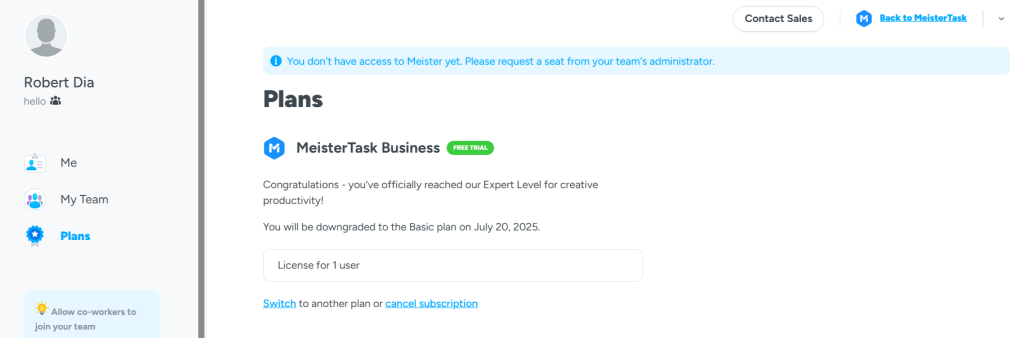
MeisterTask is a Kanban-based project management tool that focuses on simplicity and ease of use. It offers a clean, intuitive interface perfect for smaller teams. While it has fewer features than some other platforms, it provides all the essential tools for task management and collaboration.
Features:
-
Kanban boards for task management
-
Time tracking and task assignment
-
Integration with third-party tools
-
Collaboration features (comments, notifications)
Pros:
-
Easy to use and set up
-
Great for small teams or individuals
-
Clear visual layout
Cons:
-
Limited features on the free plan
-
Lacks some advanced project management tools
Pricing: Free plan available, $8.25/month for the Pro plan
5. Fondue by Kanbanize (Free Tier)

Best For: Lean and agile project tracking with powerful analytics
Review:
Fondue by Kanbanize is designed for teams that need a lean, agile project tracking system. It integrates Kanban boards with powerful analytics to track project progress and optimize workflows. The free tier is perfect for small teams looking to stay organized without the added complexity of larger project management tools.
Features:
-
Kanban boards with task tracking
-
Analytics for project tracking
-
Customizable workflows
-
Real-time collaboration tools
Pros:
-
Simple and intuitive interface
-
Agile and lean methodology focus
-
Strong analytics and reporting features
Cons:
-
Limited features in the free tier
-
Lacks some advanced integrations
Pricing: Free tier available, $5/month for the Pro plan
6. Ora

Best For: All-in-one Kanban, time tracking, and team chat
Review:
Ora is a collaborative project workspace combining Kanban boards, time tracking, chat, and reporting. It’s built for teams that want tasks, communication, and reporting in one place rather than stitching multiple tools together.
Features:
-
Kanban, list, and Gantt views for tasks
-
Time tracking from tasks or boards
-
Built-in chat, voice/video, and channels
-
Reporting on projects and team productivity
Pros:
-
Rich feature set in a single platform
-
Great for agencies and creative teams
-
Flexible workflows (Scrum, Kanban, or custom)
Cons:
-
More complex than simple Trello-style boards
-
Some advanced features only in higher-tier plans
Pricing: Free plan available (often up to ~10 users); paid plans start at around $10/user/month.
7. Kanboard (Open Source)

Best For: Lightweight, self-hosted Kanban tool for developers
Review:
Kanboard is a lightweight Kanban-based project management tool that is perfect for developers or teams who prefer a minimalistic design. It offers essential task management features and can be self-hosted for teams requiring full control over their data.
Features:
-
Kanban boards and task management
-
Self-hosted for full data control
-
Customizable workflows
-
Simple and lightweight design
Pros:
-
Free and open-source
-
Easy to set up and use for smaller teams
-
Great for developers who need minimal features
Cons:
-
Lacks advanced features like time tracking and integrations
-
Limited support options
Pricing: Free (Open Source)
8. ZenTao (Open Source)

Best For: Agile project management with bug tracking and test management
Review:
ZenTao is an open-source agile project management tool that is well-suited for teams involved in software development. It supports Scrum, Kanban, bug tracking, and test management, making it a great option for agile teams that need to manage their workflows and software projects in one place.
Features:
-
Agile project management (Scrum, Kanban)
-
Bug tracking and test management
-
Task management with backlog and sprint planning
-
Customizable workflows and reporting
Pros:
-
Open-source and self-hosted
-
Excellent for software development teams
-
Supports both Scrum and Kanban methods
Cons:
-
More complex than other Kanban tools
-
Limited integrations with third-party tools
Pricing: Free (Open Source)
9. Taiga (Free Plan)

Best For: Agile teams using Scrum or Kanban methodologies
Review:
Taiga is an open-source, agile project management tool that is perfect for Scrum and Kanban teams. It supports backlog management, sprint planning, and task tracking, making it an excellent alternative to Trello for teams that want to implement agile methodologies in their projects.
Features:
-
Scrum and Kanban boards
-
Sprint planning and backlog management
-
Real-time collaboration
-
Issue tracking and bug reporting
Pros:
-
Open-source and customizable
-
Great for agile development teams
-
Free plan available
Cons:
-
Lacks some features for larger teams
-
Limited third-party integrations
Pricing: Free plan available, $5/month for the Premium plan
10. Nuclino (Free Plan)

Best For: Real-time collaborative workspace with Kanban view
Review:
Nuclino combines Kanban boards with real-time collaboration, making it an excellent choice for teams looking to manage tasks and knowledge in one platform. It offers a simple and intuitive interface, perfect for teams that need to collaborate on documents while tracking tasks. The free plan is great for small teams that don’t need complex features.
Features:
-
Kanban task management
-
Real-time collaboration and editing
-
Document and knowledge base creation
-
Simple user interface
Pros:
-
Great for knowledge management and task tracking
-
Simple and easy-to-use interface
-
Real-time collaboration for teams
Cons:
-
Limited features for large teams
-
Lacks advanced task management features
Pricing: Free plan available, $5/month for the Personal Pro plan
11. Favro (Free Plan)
Best for: Teams needing a mix of Kanban, calendars, and task boards
Review:
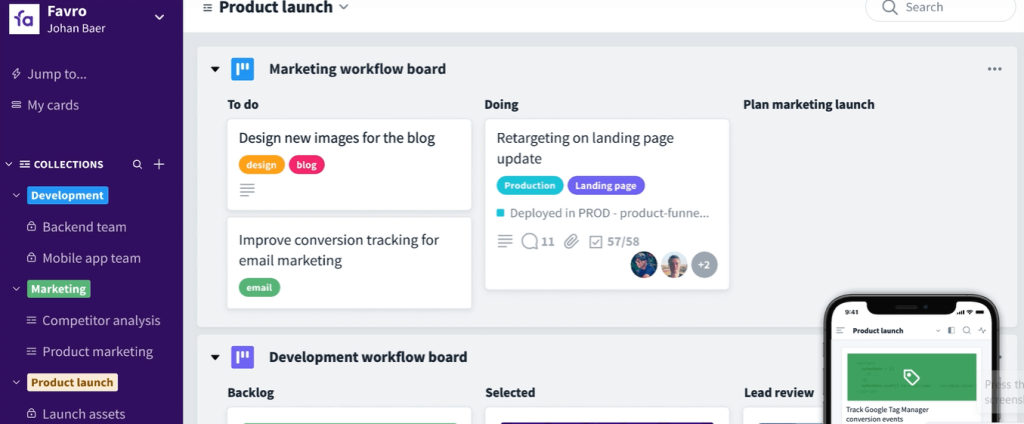
Favro offers a flexible project management solution that combines Kanban boards, calendar views, and task boards. It’s perfect for teams that need to manage tasks visually while also tracking deadlines and milestones. Favro’s free plan is ideal for smaller teams who want a customizable, easy-to-use tool.
Features:
-
Kanban boards, calendars, and task lists
-
Team collaboration and communication tools
-
Custom workflows and templates
-
Integrations with various apps
Pros:
-
Flexible and customizable
-
Great for teams that need multiple views (Kanban, calendar)
-
User-friendly interface
Cons:
-
Limited advanced features in the free plan
-
Somewhat steep learning curve for beginners
Pricing: Free plan available; paid plans start at $5/month per user for the Standard plan.
12. Yodiz (Free Plan)

Best For: Agile project management with Scrum, Kanban & backlog tools
Review:
Yodiz is designed for agile teams, offering Scrum, Kanban, and backlog management features. It’s perfect for teams working in software development or those following agile methodologies. Yodiz also includes task management and reporting tools, making it an ideal choice for teams looking for an agile alternative to Trello.
Features:
-
Scrum and Kanban boards
-
Backlog management and task tracking
-
Agile project planning and reporting
-
Sprint tracking and time management
Pros:
-
Strong agile project management tools
-
Simple user interface
-
Free plan available for small teams
Cons:
-
Limited customization for larger teams
-
Lacks integrations with third-party tools
Pricing: Free plan available, $3.99/month for the Pro plan
13. Planka (Self-hosted)

Best For: Minimalist, privacy-focused open-source Trello clone
Review:
Planka is a minimalist open-source Trello clone that focuses on simplicity and privacy. It allows teams to create Kanban boards while maintaining full control over their data through self-hosting. Planka is an excellent choice for those looking for a no-frills solution and a strong focus on privacy.
Features:
-
Kanban boards for task management
-
Self-hosted for full control of data
-
Simple user interface
Pros:
-
Free and open-source
-
Full control over data privacy
-
Lightweight and simple
Cons:
-
Requires self-hosting and technical setup
-
Limited integrations and features compared to other tools
Pricing: Free (Open Source)
14. Twproject (Free Trial)
Best For: Small teams trying out full-featured project management
Review:
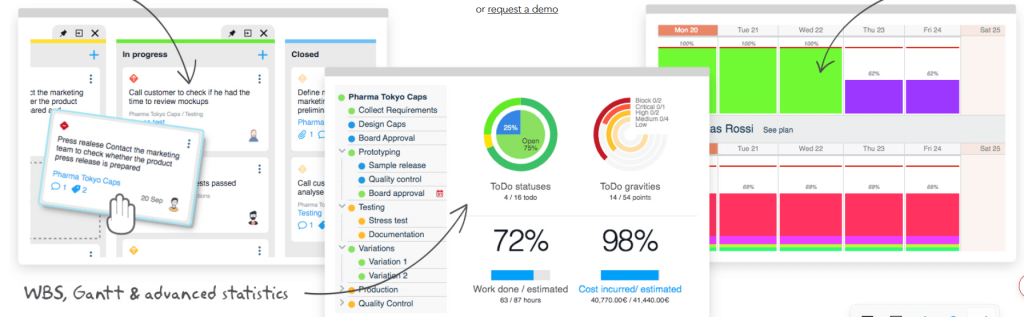
Twproject is a robust project management tool with advanced task management, time tracking, and Gantt charts. It’s ideal for small teams that want to experiment with a more comprehensive tool without committing to a paid plan. The free trial offers full access to Twproject’s extensive features.
Features:
-
Task management and Gantt charts
-
Time tracking and scheduling
-
Team collaboration and file sharing
-
Advanced reporting tools
Pros:
-
Full-featured project management tools
-
Great for tracking time and tasks
-
Good for small teams looking for a comprehensive solution
Cons:
-
More complex than simpler tools like Trello
-
Pricing can be high for larger teams
Pricing: Free trial available, $9/month for the Professional plan
15. List’d (Free)

Best For: Personal task lists and simple board-based planning
Review:
List’d is an easy-to-use, task-focused project management tool for individuals or small teams. With its simple Kanban-style boards, List’d is ideal for managing personal tasks or small projects. It’s a great option if you need a quick and simple way to organize your tasks without the complexity of larger tools.
Features:
-
Kanban boards for task management
-
Task prioritization and deadlines
-
Simple user interface
Pros:
-
Free to use with basic task management features
-
Ideal for personal use and small teams
-
Minimalist, intuitive design
Cons:
-
Lacks advanced project management features
-
Limited integrations with other tools
Pricing: Free
How to Choose the Best Trello Alternative
When selecting the best free alternative to Trello, consider the following:
- Customization: Look for platforms like ClickUp or Notion if you need custom workflows and flexibility.
- Simplicity: If you prefer a minimalist tool, List’d or Kanboard may be a better fit.
- Agile Tools: For Scrum and Kanban workflows, consider tools like Yodiz or Taiga.
- Data Privacy: If privacy is a concern, Planka or WeKan (open source) are excellent options.
- Integrations: If integration with other tools is important, ClickUp and MeisterTask offer many options.
Conclusion
Choosing the right free alternative to Trello depends on your team’s needs and workflow. Whether you need a simple Kanban board, a fully customizable project management tool, or an open-source solution for full data control, there’s an option available for every team. The tools reviewed above, such as ClickUp, Notion, and Taiga, offer a wide variety of features suitable for different project management styles, from agile teams to freelancers and small teams.
FAQs
What is the best free Trello alternative?
ClickUp and Notion are excellent free alternatives with customizable workflows and Kanban views.
Can I use an open-source Trello alternative?
Yes, WeKan, Kanboard, and Planka offer open-source options for self-hosting.
Is there a Microsoft alternative to Trello?
Microsoft Planner is a free alternative for Microsoft 365 users, integrated with Teams and Outlook.
Which Trello alternative is best for agile teams?
Taiga and Yodiz are great for agile project management with Scrum and Kanban.
Are there any personal task management alternatives to Trello?
List’d is a great free option for personal task management with a simple board-based planning system.

